

 GitHub
Receba novidades do Hedhog no seu e-mail
Novos lançamentos, receitas e breaking changes — sem spam.
Autenticação Multifator
O Hedhog suporta três métodos de segundo fator — TOTP (apps autenticadores), códigos de uso único por e-mail e WebAuthn (passkeys/chaves de segurança) — além de códigos de recuperação de uso único para recuperação de conta. Este é um recurso totalmente implementado, construído sobre speakeasy (TOTP), qrcode (geração de QR) e @simplewebauthn/server (WebAuthn), tudo em libraries/core/src/profile/.
Status: ✅ Totalmente implementado — TOTP, Email OTP, WebAuthn e códigos de recuperação funcionam, incluindo o fluxo de desafio de login.
Configuração Rápida
- Certifique-se de que um provedor de e-mail está configurado se você for permitir Email OTP
- Registre o TOTP você mesmo primeiro:
POST /profile/totp/generate→ escaneie o QR code →POST /profile/totp/verify - Saia e entre novamente — confirme que a resposta retorna
requiresMfa: trueantes de qualquer token ser emitido, e que enviar o código completa o login - Salve os códigos de recuperação mostrados no registro — não há como visualizá-los novamente depois
Como Funciona
Registrando um método (já estando logado)
Todo o registro acontece através dos endpoints /profile/*, restritos ao usuário logado:
| Passo | Endpoint |
|---|---|
| 1. Confirmar que é realmente você antes de adicionar um novo método | POST /profile/mfa/check-verification → POST /profile/mfa/verify-before-add |
| 2a. TOTP: gerar um secret + QR code | POST /profile/totp/generate |
| 2a. TOTP: confirmar o primeiro código de 6 dígitos para ativar | POST /profile/totp/verify |
| 2b. Email OTP: enviar um código para o e-mail da conta | POST /profile/mfa/email/verify |
| 2b. Email OTP: confirmar o código para ativar | POST /profile/mfa/email/verify/confirm |
| 2c. WebAuthn: iniciar o registro (passkey/chave de segurança) | POST /profile/webauthn/generate |
| 2c. WebAuthn: confirmar o attestation | POST /profile/webauthn/verify |
Cada método registrado se torna uma linha em user_mfa (type ∈ totp, email, webauthn), com o secret/credencial armazenado em uma tabela user_mfa_totp, user_mfa_email ou user_mfa_webauthn correspondente.
O desafio de login (segundo fator no acesso)
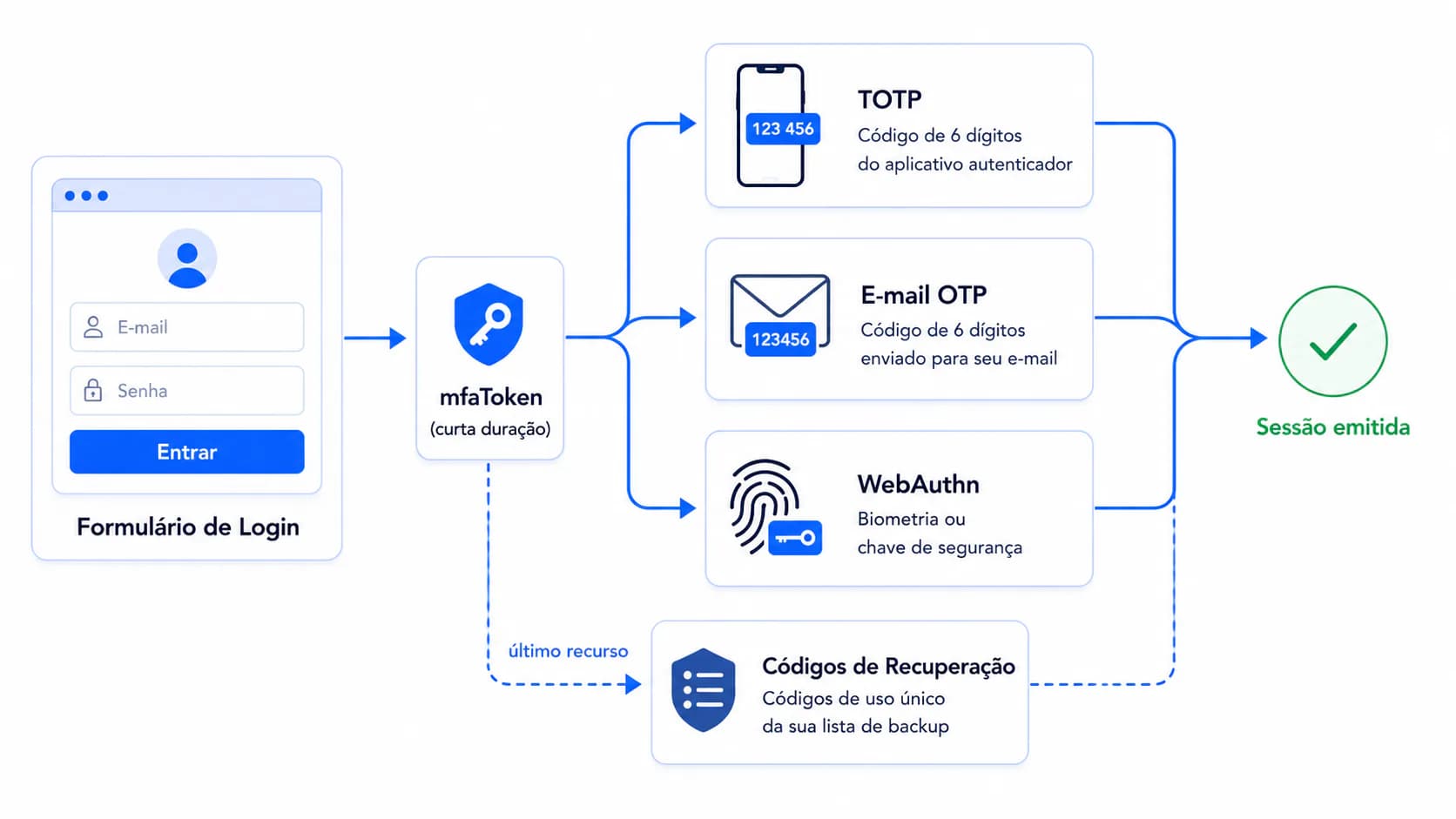
Esta é a parte que passa fácil despercebida se você só ler os endpoints de registro: o login em si não chama nenhuma rota /profile/mfa/*. Uma vez que uma senha é verificada para um usuário com pelo menos um método de MFA registrado, o AuthService retorna:
{ "requiresMfa": true, "mfaToken": "..." }
em vez de um access token. Sua UI de login precisa checar por requiresMfa e solicitar o segundo fator usando esse mfaToken de curta duração — não a sessão do usuário:
| Método | Endpoint |
|---|---|
| Código TOTP ou de e-mail | POST /auth/verify-mfa-code com { mfaToken, code, methodType } (methodType: totp, email ou recovery) |
| Reenviar o código de e-mail | POST /auth/resend-mfa-code com { token: mfaToken } |
| WebAuthn | POST /auth/webauthn/authenticate/generate com { mfaToken }, depois POST /auth/webauthn/authenticate/verify com { mfaToken, assertionResponse } |
| Código de recuperação (trancado para fora de todos os outros métodos) | endpoint dedicado de verificação de código de recuperação, também identificado por mfaToken |
Somente depois que um desses tem sucesso é que o backend emite o par real de access/refresh token.
Configurações
| Chave de configuração | Descrição |
|---|---|
require-mfa | Força o registro de MFA globalmente — sem isto, o MFA é opcional por usuário |
mfa-issuer | Nome mostrado dentro do app autenticador ao lado do código (padrão Hedhog) |
mfa-window | Janela de tolerância, em intervalos TOTP de 30 segundos, para absorver desvio de relógio entre o servidor e o telefone (padrão 1) |
mfa-setp | Passo de tempo do TOTP em segundos (padrão 30) — sim, está escrito setp no slug real da configuração, não é um erro de digitação nesta doc |
mfa-email-code-length | Dígitos no OTP enviado por e-mail (padrão 6) |
mfa-challenge-expiration-minutes | Por quanto tempo um mfaToken (e qualquer desafio de e-mail/WebAuthn pendente) permanece válido antes que o usuário precise reiniciar o login (padrão 15) |
Configure-as em Settings → Configurations → Authentication — as configurações de MFA ficam neste grupo, não em um "MFA" dedicado.
TOTP — Apps Autenticadores
Funciona com qualquer app RFC 6238: Google Authenticator, Authy, Microsoft Authenticator, 1Password, Bitwarden.
- O cliente chama
POST /profile/totp/generate— o servidor retorna{ secret, otpauthUrl, qrCode } - O usuário escaneia o
qrCode(ou insere manualmente osecret) no seu app autenticador - O cliente chama
POST /profile/totp/verifycom o primeiro código de 6 dígitos que o app mostra, mais osecrete umnamepara o dispositivo - O Hedhog valida o código contra o secret (honrando
mfa-window/mfa-setp) e, apenas em caso de sucesso, persiste o método e emite códigos de recuperação se este for o primeiro método de MFA do usuário
Se o código é sempre rejeitado mesmo recém-gerado, a causa mais comum é desvio de relógio real no servidor ou no telefone do usuário — mfa-window absorve um pouco disso, mas não desvio ilimitado.
Email OTP
Nenhum app necessário — funciona para qualquer usuário com um e-mail verificado.
POST /profile/mfa/email/verifyenvia um código (comprimento conformemfa-email-code-length) para o e-mail da contaPOST /profile/mfa/email/verify/confirmo ativa assim que o usuário insere o código
No login, o par equivalente é POST /auth/verify-mfa-code (methodType: 'email') e POST /auth/resend-mfa-code se o código expirou ou nunca chegou. O Email OTP obviamente depende de um provedor de e-mail funcional — se a entrega de e-mails estiver quebrada, usuários registrados apenas em MFA por e-mail ficarão totalmente trancados para fora do login, não apenas do registro.
WebAuthn — Passkeys e Chaves de Segurança
Segundo fator baseado em padrões e resistente a phishing, usando a API WebAuthn nativa do navegador (Touch ID, Windows Hello, chaves de hardware como a YubiKey).
POST /profile/webauthn/generateretorna opções de registro (nameé o rótulo mostrado para este dispositivo depois)- A chamada
navigator.credentials.create()do navegador usa essas opções para produzir um attestation POST /profile/webauthn/verifycom esse attestation completa o registro, armazenando a credencial emuser_mfa_webauthn
No login: POST /auth/webauthn/authenticate/generate (com mfaToken) retorna opções de assertion para navigator.credentials.get(), e POST /auth/webauthn/authenticate/verify (com mfaToken + o assertionResponse resultante) completa o login.
Códigos de Recuperação
Gerados automaticamente na primeira vez que um usuário registra qualquer método de MFA — 10 códigos de uso único, mostrados uma vez, com hash argon2 em user_recovery_code antes do armazenamento (o Hedhog nunca os armazena em forma recuperável, então não existe um recurso de "ver meus códigos de recuperação novamente", por design).
| Endpoint | Propósito |
|---|---|
POST /profile/recovery-codes/send-verification → POST /profile/recovery-codes/regenerate | Invalidar todos os códigos antigos e emitir um novo conjunto de 10 |
DELETE /profile/mfa/:mfaId/remove-with-recovery-code | Usar um código de recuperação para remover um método de MFA perdido (ex.: o telefone com o app autenticador foi perdido) quando nenhum outro método está disponível |
Diga aos usuários explicitamente, no momento do registro, que perder tanto o segundo fator quanto os códigos de recuperação significa bloqueio permanente, exceto por intervenção manual de admin/banco de dados — não há um fluxo de "o suporte redefine seu MFA" embutido.
Tente isto uma vez, em um ambiente não-produtivo: use um código de recuperação para fazer login e confirme que ele realmente funciona antes de depender dele de verdade.
Removendo um Método
Todo endpoint de remoção exige reprovar a identidade primeiro — você não pode remover silenciosamente o MFA de uma sessão sequestrada:
| Método | Endpoint |
|---|---|
| TOTP | DELETE /profile/totp/:mfaId/remove com { token } de check-verification-remove |
DELETE /profile/email/:mfaId/remove com { token, hash } | |
| WebAuthn | DELETE /profile/webauthn/:mfaId/remove |
| Qualquer método, via código de recuperação | DELETE /profile/mfa/:mfaId/remove-with-recovery-code |
Verifique se Funcionou
- Saia e entre novamente com um usuário que tem MFA registrado — confirme que a resposta inclui
requiresMfa: trueantes de qualquer token ser emitido - Envie o segundo fator e confirme que só agora você recebe
accessToken/refreshToken - Teste um código de recuperação conforme descrito acima — não espere até estar realmente trancado para fora para descobrir que ele não funciona
Solução de Problemas
| Sintoma | Causa provável |
|---|---|
A resposta de login tem requiresMfa: true mas o frontend mostra um erro genérico | A UI não está tratando requiresMfa — ela precisa ramificar para a tela de segundo fator em vez de tratar a resposta como um login falho |
| Os códigos TOTP nunca validam | Desvio de relógio além de mfa-window × mfa-setp segundos, ou o secret errado foi escaneado |
| Usuário trancado para fora após perder o telefone | Use um código de recuperação via verify-mfa-code (methodType: 'recovery') no login, ou remove-with-recovery-code uma vez logado em outro lugar |
| Usuários de MFA por e-mail não conseguem fazer login de jeito nenhum | O provedor de e-mail configurado está quebrado — conserte isso primeiro, isto não é um bug de MFA |