

 GitHub
Get Hedhog updates in your inbox
New releases, fresh recipes, and breaking changes — no spam.
Core Submodule
ai
Provides AI chat flows and AI agent lifecycle endpoints.
Source path: libraries/core/src/ai
Module file: ai.module.ts
Introduction
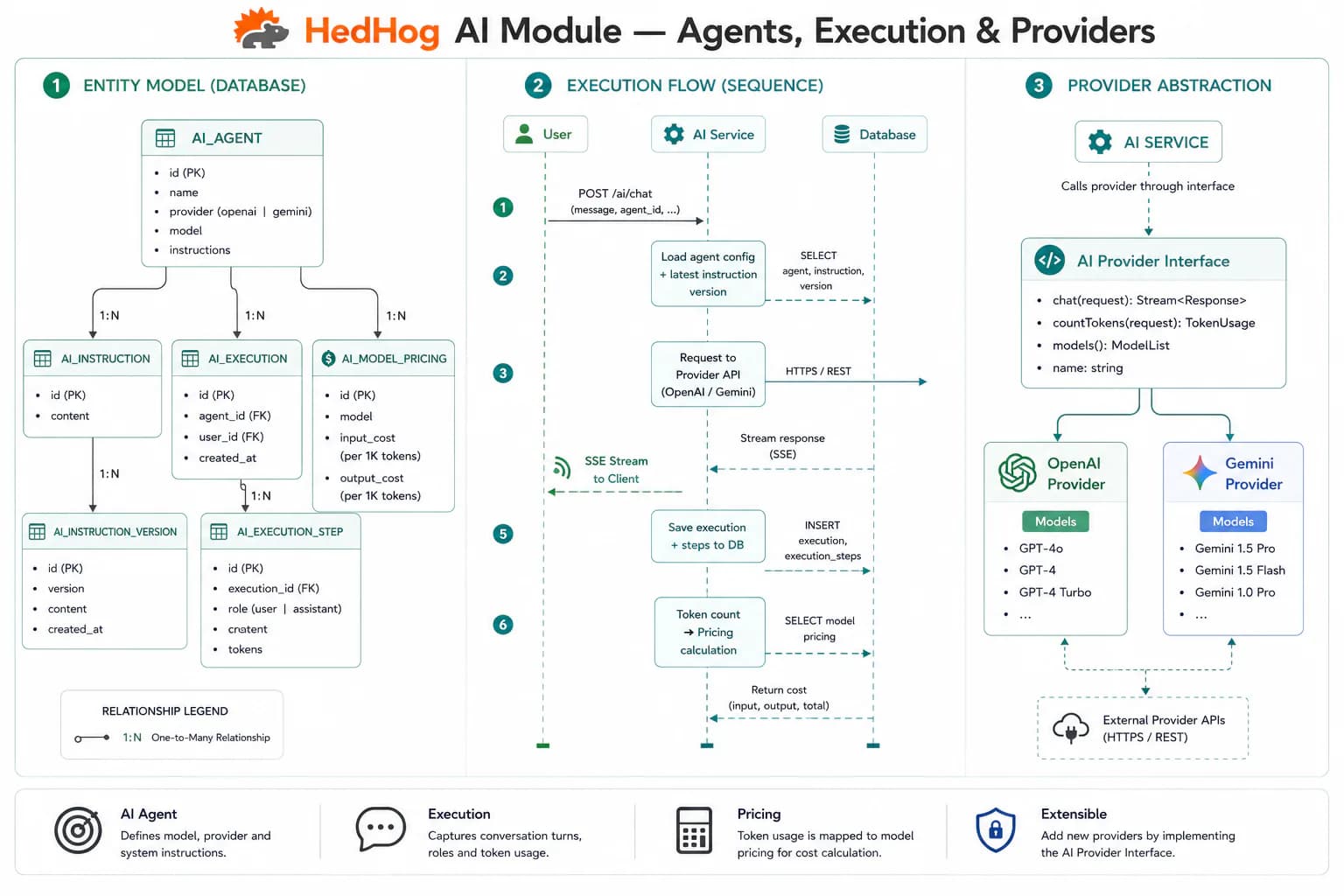
The AI submodule provides a unified gateway for interacting with large language models across multiple providers. Rather than coupling your application to a single AI vendor, HedHog abstracts provider-specific APIs behind a common interface, making it straightforward to switch between OpenAI GPT models and Google Gemini without changing application code. Providers and models are resolved from Integration Profiles or environment variables, with agent-level overrides taking precedence over global defaults.
The submodule supports two interaction modes. Direct chat sends a one-shot message to the default provider and returns a single response. AI Agents are named, persistently configured entities stored in the database — each agent carries its own provider, model, system prompt (instructions), and slug identifier. This lets product teams define purpose-specific assistants — a data-analysis agent, a customer-support bot, a content-generation pipeline — that remain consistent across deployments without hardcoding configuration into client code.
Both the direct-chat and agent-chat endpoints accept an optional file_id parameter. When provided, the API retrieves the file from the File submodule and includes its content as context in the LLM request, enabling document summarization, code review, and content extraction workflows without building a separate ingestion pipeline.
All AI operations are also exposed as MCP tools (core.ai.*), meaning any MCP-compatible AI assistant — Claude Desktop, Cursor, a custom agent — can manage agents and send messages through the same permission-controlled surface as HTTP callers.
HTTP Endpoints
8 endpoints
Send a message to the default AI and receive a response.
Body
| Field | Type | Required | Notes |
|---|---|---|---|
| message | string | yes | — |
| provider | "openai" | "gemini" | no | — |
| model | string | no | — |
| systemPrompt | string | no | — |
| file_id | number | no | ID of an uploaded file |
List all configured AI agents with pagination.
- Query
- page, pageSize, search
Get an AI agent by its numeric ID.
- Params
- agentId (int)
Get an AI agent by its slug identifier.
- Params
- slug (string)
Create a new AI agent.
Body
| Field | Type | Required | Notes |
|---|---|---|---|
| slug | string | yes | — |
| provider | "openai" | "gemini" | no | — |
| model | string | no | — |
| instructions | string | no | System prompt / instructions |
Update an existing AI agent.
- Params
- agentId (int)
Body
| Field | Type | Required | Notes |
|---|---|---|---|
| slug | string | no | — |
| provider | "openai" | "gemini" | no | — |
| model | string | no | — |
| instructions | string | no | — |
Delete one or more AI agents.
Body
| Field | Type | Required | Notes |
|---|---|---|---|
| ids | number[] | yes | IDs to delete |
Send a message to a specific AI agent and receive a response.
- Params
- slug (string)
Body
| Field | Type | Required | Notes |
|---|---|---|---|
| message | string | yes | — |
| file_id | number | no | ID of an uploaded file |
MCP Tools
Named tools callable by AI models via the Model Context Protocol (MCP).
core.ai.chatSend a message to the default AI provider and receive a response
core.ai.agents.listList all configured AI agents with pagination
core.ai.agents.getGet an AI agent by its numeric ID
core.ai.agents.get-by-slugGet an AI agent by its slug identifier
core.ai.agents.createCreate a new AI agent with slug, provider, model, and instructions
core.ai.agents.updateUpdate an existing AI agent's configuration
core.ai.agents.deleteDelete one or more AI agents
core.ai.agents.chatSend a message to a specific AI agent and receive a response