

 GitHub
Get Hedhog updates in your inbox
New releases, fresh recipes, and breaking changes — no spam.
Core Submodule
auth
Handles authentication, session tokens, MFA and password recovery.
Source path: libraries/core/src/auth
Module file: auth.module.ts
Introduction
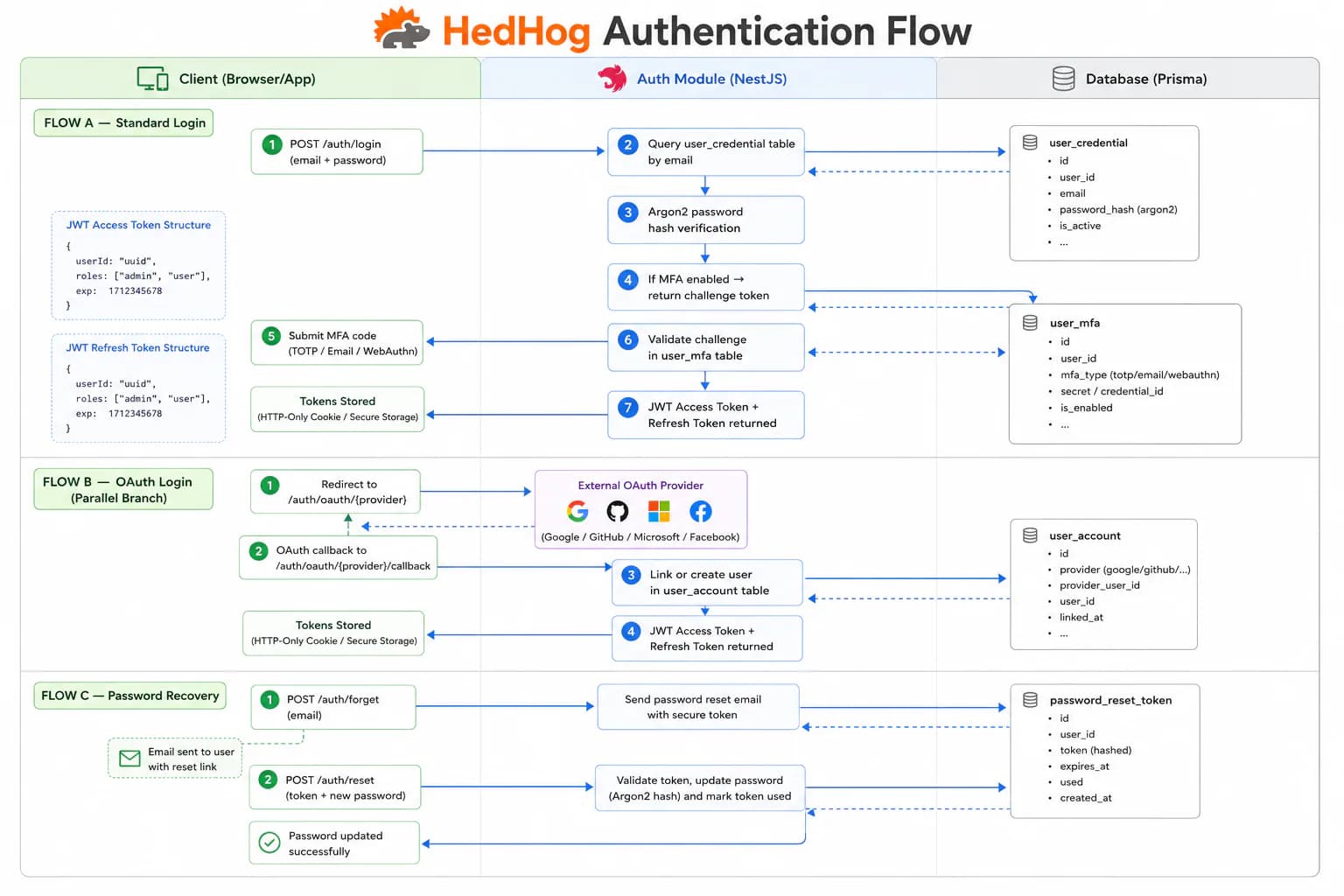
The Auth submodule manages every phase of the user identity lifecycle: credential exchange, session token issuance, multi-factor authentication challenges, password recovery, and session termination. It is the entry point for all user-facing authentication and the guardian of every protected resource in the platform.
Login returns a short-lived JWT access token used in the Authorization: Bearer header for protected endpoints, and optionally a long-lived refresh token. The refresh token can be exchanged for a new access/refresh pair without re-authentication, enabling seamless session continuity across browser sessions and mobile apps. Logout invalidates the refresh token server-side, ensuring the session ends even if the access token has not yet expired naturally.
HedHog supports three MFA channels. TOTP works with any standards-compliant authenticator app (Google Authenticator, Authy, 1Password). Email OTP sends a six-digit code to the user's verified email address. WebAuthn uses the Web Authentication API to leverage hardware security keys, Face ID, Touch ID, or Windows Hello. When MFA is enabled, the standard login flow responds with a pending mfaToken instead of a full session — the client must submit the correct code through the matching verification endpoint to receive the final access token. Recovery codes provide a backup when the primary MFA device is unavailable.
The forgot-password flow is two-step: a time-limited, single-use code is sent to the registered email (POST /auth/forgot), and that code is then submitted alongside the new password (POST /auth/forgot-reset). The WebAuthn assertion ceremony follows the same two-step model — generate options, then verify the signed response from the authenticator.
Self-registration via POST /auth/signup is available for open-registration platforms. For invite-only or admin-provisioned deployments, this endpoint can be locked down through route-level permissions without changing code.
HTTP Endpoints
15 endpoints
Verify that the current access token is valid and return the authenticated user.
Return the list of roles available to the authenticated user.
Authenticate with email and password; returns access and refresh tokens.
Body
| Field | Type | Required | Notes |
|---|---|---|---|
| string | yes | Valid email address | |
| password | string | yes | Strong password |
| refreshToken | boolean | no | Request a refresh token in response |
Exchange a refresh token for a new access/refresh token pair.
Body
| Field | Type | Required | Notes |
|---|---|---|---|
| refreshToken | string | yes | Valid refresh token |
Register a new user account.
Body
| Field | Type | Required | Notes |
|---|---|---|---|
| name | string | yes | — |
| string | yes | Valid email address | |
| password | string | yes | Strong password |
Invalidate the given refresh token, ending the session.
Body
| Field | Type | Required | Notes |
|---|---|---|---|
| refreshToken | string | yes | — |
Initiate the password reset flow by sending a reset code to the user's email.
Body
| Field | Type | Required | Notes |
|---|---|---|---|
| string | yes | Valid email address |
Complete the password reset using the code received by email.
Body
| Field | Type | Required | Notes |
|---|---|---|---|
| code | string | yes | Reset code received by email |
| password | string | yes | Min 8 chars |
Verify an email-based login code during multi-factor authentication.
Body
| Field | Type | Required | Notes |
|---|---|---|---|
| token | string | yes | Pending login token |
| code | string | yes | Pin code from email |
Resend the email verification code for a pending login.
Body
| Field | Type | Required | Notes |
|---|---|---|---|
| token | string | yes | Pending login token |
Verify a one-time MFA code (TOTP or email) to complete login.
Body
| Field | Type | Required | Notes |
|---|---|---|---|
| token | string | yes | JWT pending login token |
| code | string | yes | — |
| methodType | "totp" | "email" | "recovery" | no | — |
Complete login using a recovery code when the primary MFA method is unavailable.
Body
| Field | Type | Required | Notes |
|---|---|---|---|
| token | string | yes | JWT pending login token |
| code | string | yes | Recovery code |
Resend the MFA code for a pending authentication challenge.
Body
| Field | Type | Required | Notes |
|---|---|---|---|
| token | string | yes | JWT pending login token |
Generate WebAuthn assertion options for passkey-based MFA verification.
Body
| Field | Type | Required | Notes |
|---|---|---|---|
| mfaToken | string | yes | JWT pending MFA token |
Verify a WebAuthn assertion response and complete passkey authentication.
Body
| Field | Type | Required | Notes |
|---|---|---|---|
| mfaToken | string | yes | JWT pending MFA token |
| assertionResponse | object | yes | WebAuthn assertion from the browser |
MCP Tools
No MCP tools mapped for this submodule.