

 GitHub
Get Hedhog updates in your inbox
New releases, fresh recipes, and breaking changes — no spam.
Payments
Hedhog's commerce module integrates with Stripe and Mercado Pago for one-time charges and recurring subscriptions. Credentials live in an Integration Profile (type payment), and a single setting picks which one is active.
How It Works
- Create an Integration Profile of type Payment, provider
stripeormercado_pago, with the gateway's keys in its config - Point
commerce-default-payment-profile-idat that profile — either by setting it directly, or (recommended) by using the Auto-configure webhook action described below, which sets it for you CommerceCheckoutService.processCheckout()loads that profile and calls the gateway directly: Mercado Pago viaPOST https://api.mercadopago.com/v1/payments(or/preapprovalfor recurring plans), Stripe via the legacy Charges APIPOST https://api.stripe.com/v1/charges- The result is recorded in
commerce_payment/commerce_order, and entitlements or subscriptions are created on success
Only one payment profile is active at a time — commerce-default-payment-profile-id is a single setting, not per-product or per-currency.
Status: ⚠️ Works end-to-end, but only if wired through the correct webhook URL — see "The Webhook URL Is Not What You'd Expect" below, the single most common setup mistake.
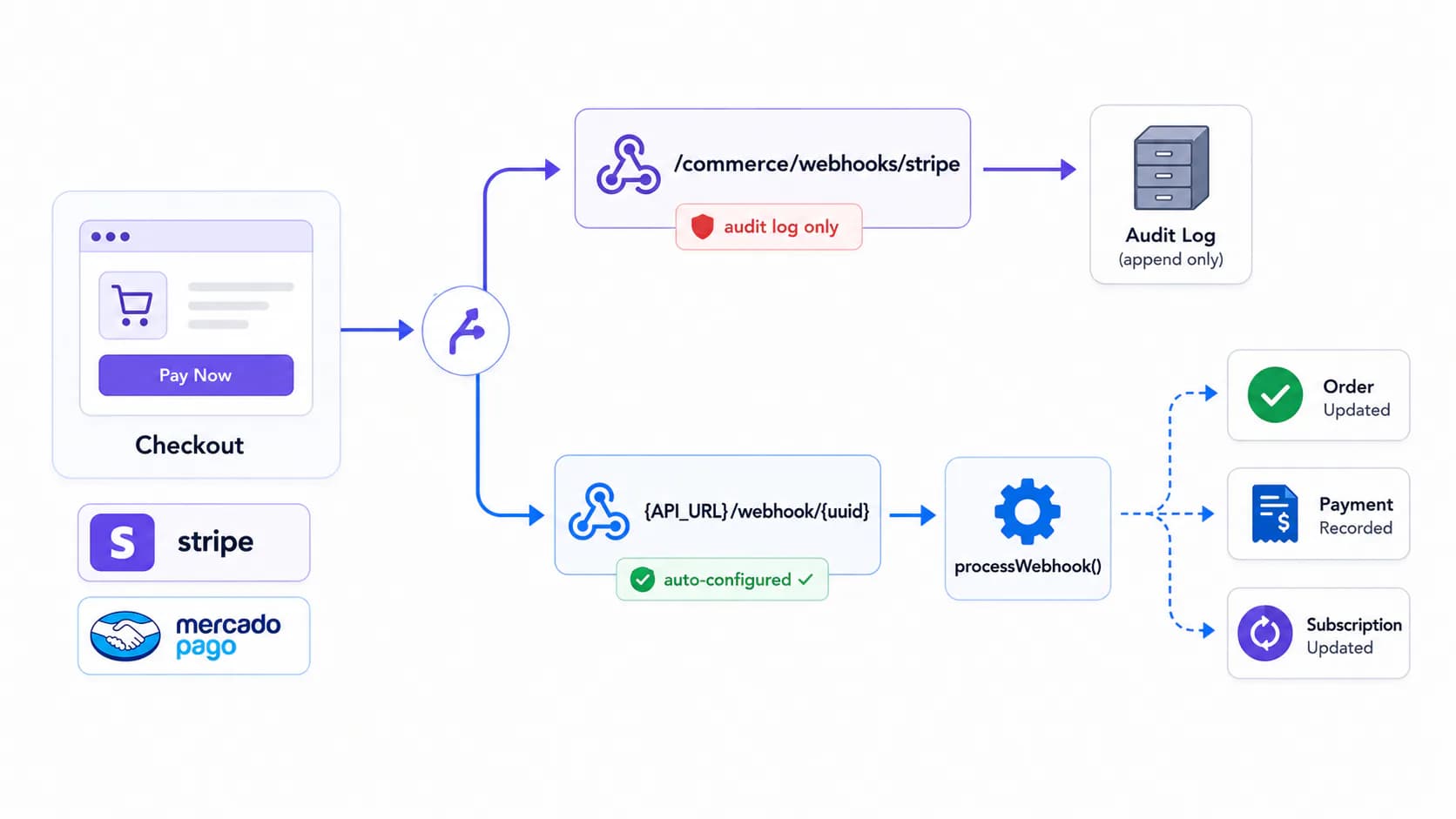
Quick Setup
- Create an Integration Profile (type Payment, Stripe or Mercado Pago) with its keys at Settings → Integration Profiles
- Go to Commerce → Webhooks → Webhook Settings, select the profile, and click Generate Webhook
- Copy the generated
{API_URL}/webhook/{public_uuid}URL into the gateway's dashboard — not/commerce/webhooks/... - Run a test charge and confirm the order flips from
pendingtopaidon its own
Setting Up
| Config field | Stripe | Mercado Pago |
|---|---|---|
public_key | Publishable key, returned to the client for Stripe.js (Stripe expects pk_live_… / pk_test_…) | Public key used by the Mercado Pago JS SDK on the checkout page |
secret_key | Secret key for server-side charges (sk_live_… / sk_test_…) | — |
access_token | — | Server-side access token (APP_USR-…) used for both charges and the webhook status lookup |
notification_url | — | Optional — sent to Mercado Pago as the notification_url on payments/preapprovals. Leave empty unless you have a reason to bypass the auto-configured webhook below |
Stripe note: Hedhog's current Stripe integration uses the classic Charges API with a card
sourcetoken, not PaymentIntents/Elements. Your checkout frontend needs to tokenize the card into asource/tokencompatible with this API before calling Hedhog's checkout endpoint.
The Webhook URL Is Not What You'd Expect
This is the part most likely to trip up a new developer: Hedhog does not use a fixed, predictable webhook path like /api/payment/stripe/webhook. There are two different endpoints, and only one of them actually updates payment/order/subscription status:
| Endpoint | What it does |
|---|---|
POST {API_URL}/commerce/webhooks/stripePOST {API_URL}/commerce/webhooks/mercado-pago | Logs the raw event into commerce_webhook_event for audit/debugging. Does not process status changes. |
| The auto-configured public URL (see below) | A dynamically generated, UUID-based webhook endpoint that actually calls CommerceCheckoutService.processWebhook() — this is what updates payments, orders, and subscriptions |
To get the real, working webhook URL:
- In the admin, go to Commerce → Webhooks, open Webhook Settings, and select your payment Integration Profile — this immediately saves it as
commerce-default-payment-profile-id - Click Generate Webhook (calls
POST {API_URL}/commerce/webhooks/auto-configurewith{ "integrationProfileId": <id> }) - Hedhog creates (or reuses) a generic Webhook Integration under Settings → Integrations and Webhooks, and the sheet shows you a public ingestion URL of the form
{API_URL}/webhook/{public_uuid}with a copy-to-clipboard button - Register that
{API_URL}/webhook/{public_uuid}URL in the Stripe or Mercado Pago dashboard — not the/commerce/webhooks/...path
If payments succeed but orders never flip to "paid" and subscriptions never activate, check this first — it almost always means the gateway is pointed at the audit-log endpoint instead of the auto-configured one.
Stripe
Console: dashboard.stripe.com
- Activate your account for live mode once you're ready (test mode works immediately with no activation)
- Go to Developers → API keys and copy the Publishable key and Secret key into the Integration Profile
- Run the Generate Webhook step above, then go to Developers → Webhooks → Add endpoint in the Stripe dashboard and paste the generated
{API_URL}/webhook/{public_uuid}URL - Select at least
charge.succeeded,charge.failed, and any subscription-related events your plans use
Test card: 4242 4242 4242 4242, any future expiry, any CVC.
Mercado Pago
Console: developers.mercadopago.com
- Under Your integrations → Create application, go to Credentials and copy the Access token and Public key (use the Test credentials tab while developing)
- Run the Generate Webhook step above, then register the resulting
{API_URL}/webhook/{public_uuid}URL as the application's webhook/IPN notification URL in the Mercado Pago dashboard - For recurring plans, Mercado Pago uses preapproval (subscription) objects rather than repeated charges — Hedhog creates these automatically for prices marked
billing_type: recurring
Mercado Pago supports several payment methods through the same access_token automatically: credit/debit cards, Pix (Brazil, instant transfer), and region-specific methods depending on the payer's country. Test with their test card numbers.
Verify It Worked
- Make a test charge (
4242 4242 4242 4242for Stripe, Mercado Pago's test cards for MP) and confirm the order moves frompendingtopaidon its own — if it doesn't move within a few seconds, the webhook URL is almost certainly wrong, not the charge itself - Check the Webhook Integration's log (Settings → Integrations and Webhooks) to confirm the event actually arrived
Troubleshooting
| Symptom | Likely cause |
|---|---|
Orders stay pending forever after a successful charge | Gateway is pointed at /commerce/webhooks/{stripe|mercado-pago} instead of the auto-configured {API_URL}/webhook/{uuid} URL |
No default payment profile configured | commerce-default-payment-profile-id isn't set — run Auto-configure webhook, or set it manually |
Unsupported payment provider | The Integration Profile's provider isn't stripe or mercado_pago |
| Stripe charge fails immediately with a card error | Remember Stripe here uses the Charges API with a source token — make sure the frontend is tokenizing correctly for that API, not PaymentIntents |
| Recurring Mercado Pago subscription never activates | Check that the preapproval's notification_url/webhook is reachable — Mercado Pago calls back asynchronously when the payer authorizes |