

 GitHub
Get Hedhog updates in your inbox
New releases, fresh recipes, and breaking changes — no spam.
Core Submodule
file
Stores file metadata and generates secure open/download URLs.
Source path: libraries/core/src/file
Module file: file.module.ts
Introduction
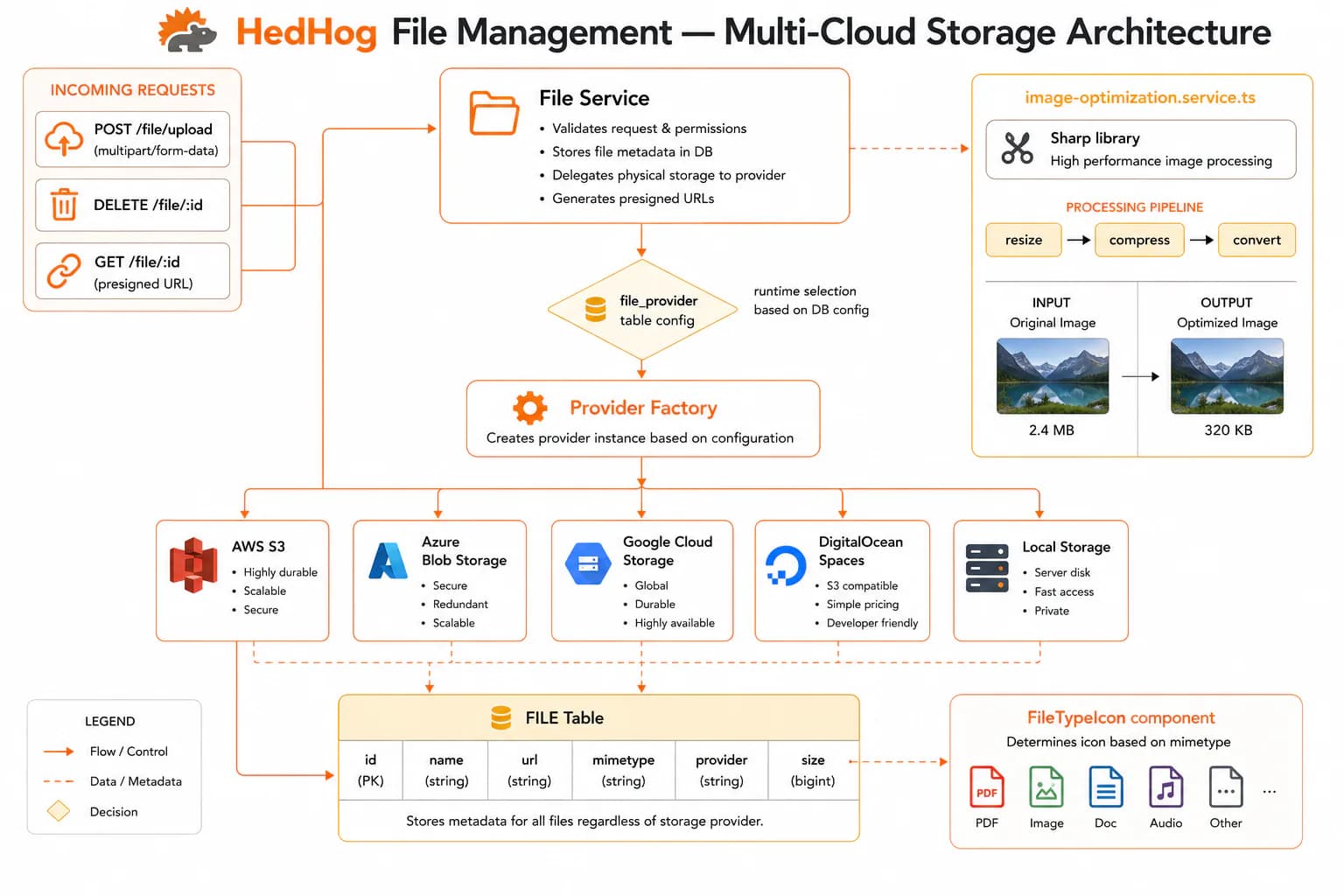
The File submodule handles the full lifecycle of binary assets: upload, metadata persistence, secure URL generation, and controlled access delivery. Files are received via multipart/form-data, stored in the configured storage backend (local disk or a cloud object storage provider), and a metadata record is written containing the original filename, MIME type, file size, storage path, and a unique identifier. The optional destination parameter lets callers specify a sub-path for organizational purposes.
Files are never served via raw storage paths. Instead, an admin generates a time-limited signed token via PUT /file/open/:id for inline viewing or PUT /file/download/:id for attachment download. The token encodes the file ID, an expiry timestamp, and a server-side secret. Public endpoints decode and validate the token before streaming the file, preventing storage path enumeration and enforcing per-request expiry without maintaining a session.
The File submodule is used as a shared infrastructure layer by several other Core submodules. The User submodule stores avatars as File records. The Dashboard submodule stores widget component preview screenshots through the same pipeline. The Setting submodule's import workflow accepts JSON files via multipart upload. The AI submodule accepts a file_id to include document content as LLM context. This centralization means all binary assets go through a single, consistent storage and access-control pipeline regardless of which feature uploads them.
Deletion via DELETE /file removes file records and the underlying stored files. Callers are responsible for ensuring no other records hold references to the deleted file IDs before calling this endpoint, as HedHog does not automatically cascade deletes across foreign-key references.
HTTP Endpoints
8 endpoints
List all stored files with pagination.
- Query
- page, pageSize, search
Get file metadata by ID.
- Params
- id (int)
Open (serve inline) a file using a signed token.
- Params
- token (encrypted string or numeric ID)
Download a file using a signed token.
- Params
- token (encrypted string)
Generate a temporary signed URL for opening a file inline.
- Params
- id (int)
Generate a temporary signed URL for downloading a file.
- Params
- id (int)
Upload a file and store its metadata.
Body
| Field | Type | Required | Notes |
|---|---|---|---|
| file | File | yes | multipart/form-data |
| destination | string | no | Target storage path |
Delete one or more files.
Body
| Field | Type | Required | Notes |
|---|---|---|---|
| ids | number[] | yes | IDs to delete |
MCP Tools
Named tools callable by AI models via the Model Context Protocol (MCP).
core.files.listList uploaded files with pagination and search
core.files.getGet file metadata by ID
core.files.open-urlGenerate a temporary URL to open or preview a file in-browser
core.files.download-urlGenerate a temporary download URL for a file
core.files.deleteDelete one or more uploaded files