

 GitHub
Get Hedhog updates in your inbox
New releases, fresh recipes, and breaking changes — no spam.
Core Submodule
Manages mail templates/channels and validation/testing flows.
Source path: libraries/core/src/mail
Module file: mail.module.ts
Introduction
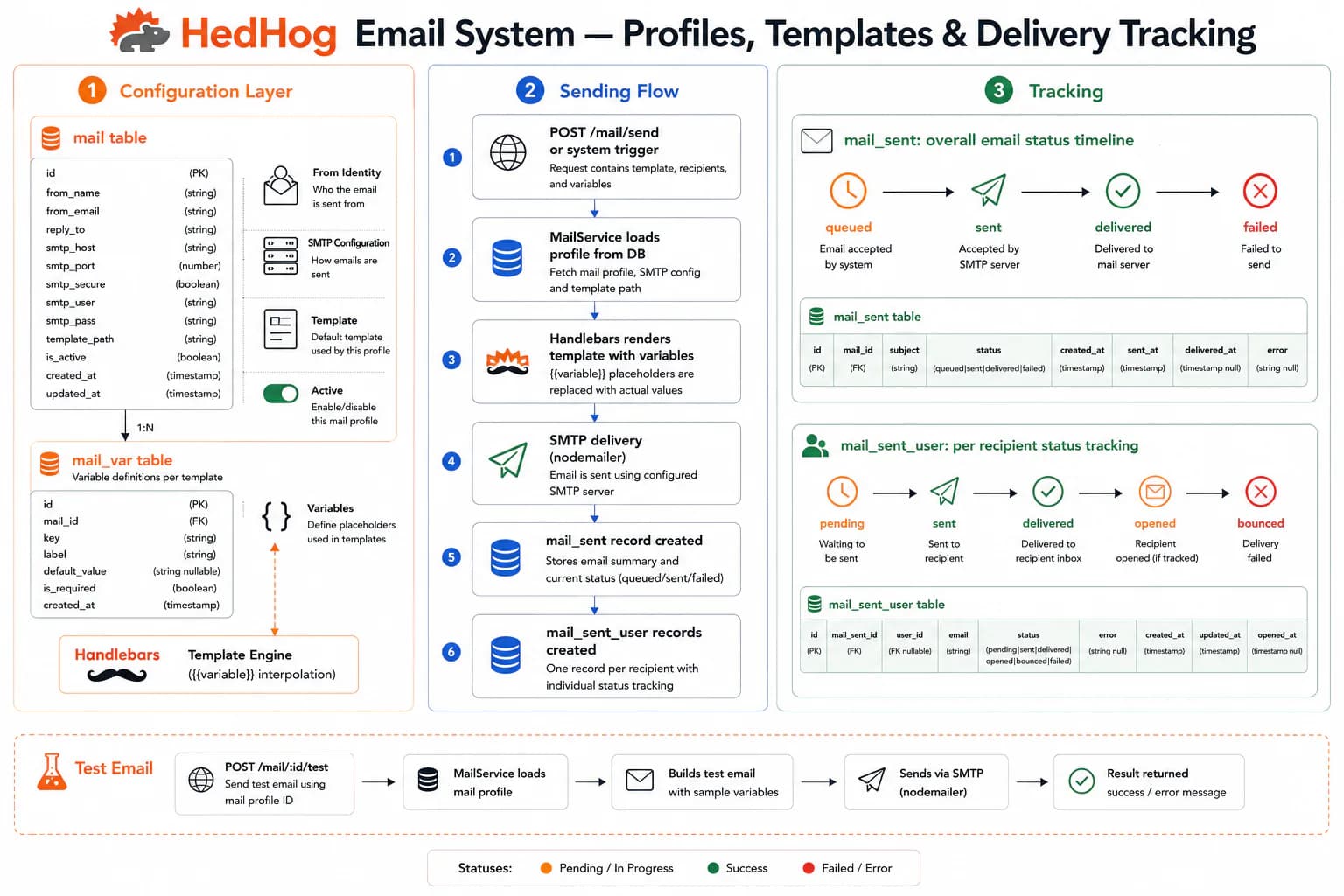
The Mail submodule manages transactional email templates and delegates actual delivery to the integration provider configured for the mail channel. Separating template management from transport means the same template system works with any SMTP server, SendGrid, Mailgun, or other provider supported by installed integration libraries — switching providers requires changing an Integration Profile, not deploying new code.
A mail template is identified by a slug and contains one or more locale-specific translations, each with a subject and an HTML body. Variable placeholders in the body are substituted at send time using a variables map. The variable schema declared in mail_var serves as documentation for consumers of the template. This design keeps template content editable through the admin panel at runtime — copy changes, localization updates, and layout adjustments do not require code deployments or server restarts.
When an email is triggered, the locale is resolved for the recipient (from user preferences or request context) and the matching translation is used. If no translation exists for the target locale, the system falls back to the default locale configured in settings. This means a single template slug works across all supported languages without conditional logic in the calling code.
POST /mail/reload triggers the mail service to re-read its provider configuration without restarting the server, allowing SMTP credential updates or provider switches in production with zero downtime. POST /mail/test renders a specified template and sends the result to a test address, making it possible to verify formatting and variable substitution before a feature ships.
The bulk import endpoint accepts a structured JSON payload containing multiple templates and upserts them in one request. With overwrite: true, existing templates are updated; without it, existing slugs are skipped. This endpoint is designed for CI/CD pipelines that manage email templates alongside application code, ensuring template content stays in version control.
Sent mail records and delivery metadata are tracked by the companion mail-sent submodule, which maintains status (received, read, error), recipient addresses, and error details for every outbound message.
HTTP Endpoints
9 endpoints
List all mail templates.
- Query
- page, pageSize, search
Get a mail template by ID, optionally in a specific locale.
- Params
- id (int)
- Query
- locale? (string)
Preview a mail template rendered as HTML.
- Params
- id (int)
- Query
- locale? (string)
Create a new mail template.
Body
| Field | Type | Required | Notes |
|---|---|---|---|
| slug | string | yes | — |
| mail_locale | { locale_id: number, subject: string, body: string }[] | no | — |
| mail_var | object[] | no | Variable definitions |
Update an existing mail template.
- Params
- id (int)
Body
| Field | Type | Required | Notes |
|---|---|---|---|
| slug | string | no | — |
| mail_locale | { locale_id: number, subject: string, body: string }[] | no | — |
| mail_var | object[] | no | — |
Delete one or more mail templates.
Body
| Field | Type | Required | Notes |
|---|---|---|---|
| ids | number[] | yes | IDs to delete |
Reload the mail configuration without restarting the server.
Send a test email using a given template.
Body
| Field | Type | Required | Notes |
|---|---|---|---|
| slug | string | yes | Template slug to render |
| string | yes | Valid email address | |
| subject | string | yes | — |
| body | string | yes | — |
| variables | Record<string, string> | no | — |
Bulk-import mail templates.
Body
| Field | Type | Required | Notes |
|---|---|---|---|
| data | { slug, translations: { code, subject, body }[], variables?: string[] }[] | yes | — |
| overwrite | boolean | no | — |
MCP Tools
Named tools callable by AI models via the Model Context Protocol (MCP).
core.mail.listList mail templates with pagination
core.mail.getGet a mail template by ID
core.mail.createCreate a new mail template with translations and variables
core.mail.updateUpdate an existing mail template
core.mail.deleteDelete one or more mail templates
core.mail.testSend a test email using the specified template
core.mail.reloadReload the mail service configuration without restarting