

 GitHub
Get Hedhog updates in your inbox
New releases, fresh recipes, and breaking changes — no spam.
Core Submodule
mcp
Hosts the MCP server endpoint and API key management.
Source path: libraries/core/src/mcp
Module file: mcp.module.ts
Introduction
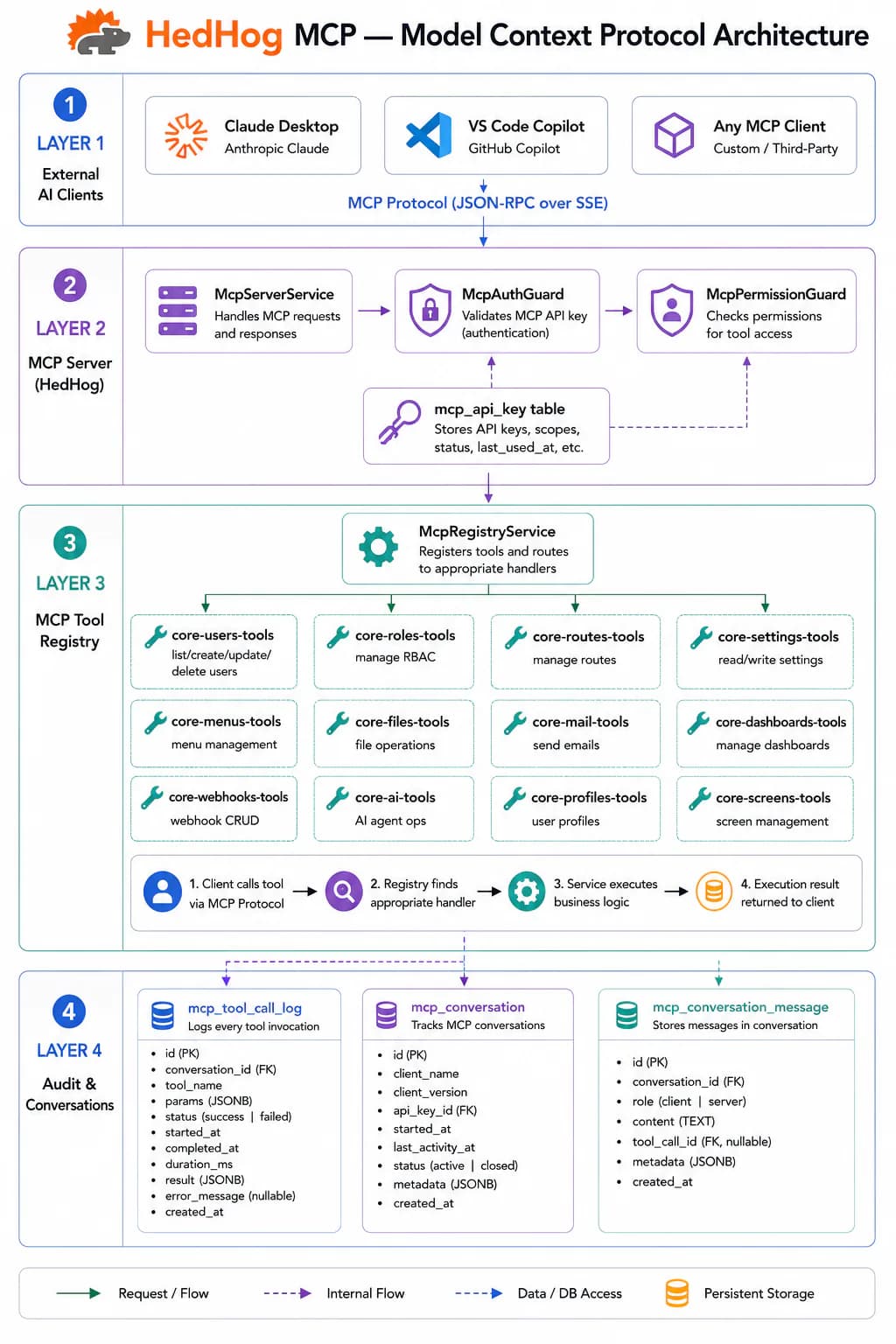
The MCP submodule implements a full Model Context Protocol server inside HedHog, exposing the entire API surface as structured, callable tools to any MCP-compatible AI assistant. MCP is an open standard developed by Anthropic that defines how AI models discover and invoke capabilities from external applications. An MCP server advertises a catalog of typed tools — each with a name, description, and JSON Schema for its parameters — that AI clients can call by name to perform real actions and retrieve real data.
Authentication uses API keys created via POST /mcp/api-keys with type "mcp". Each API key is scoped to the user who created it and carries that user's full role and permission set. This means every MCP tool call is authorized under exactly the same rules as the equivalent HTTP call — a tool that lists users requires the admin-user role whether invoked via REST or MCP. There is no separate permission model to maintain.
HedHog's MCP tools follow a hierarchical naming convention: core.<submodule>.<action> (for example, core.users.list, core.ai.agents.chat, core.settings.set). This namespace prevents collisions when multiple MCP servers are connected to the same AI client session. Libraries outside Core extend the namespace with their own prefix (lms.courses.list, crm.persons.get).
The MCP Chat submodule builds on top of the MCP server to provide conversational AI sessions that can invoke MCP tools mid-conversation, enabling AI-driven workflows where the assistant both generates prose and takes real actions — creates records, sends emails, reads dashboards — within a single conversation thread.
To connect Claude Desktop or any MCP-compatible client: create an API key, then configure the client to point at your deployment's /mcp endpoint with the key in the Authorization: Bearer header. The server advertises its tool catalog automatically via the MCP initialization handshake — no manual tool registration is needed on the client side.
HTTP Endpoints
4 endpoints
MCP server handler that processes all MCP protocol messages (tools, resources, prompts).
Body
| Field | Type | Required | Notes |
|---|---|---|---|
| (payload) | object | yes | JSON-RPC 2.0 MCP protocol message |
List API keys belonging to the current user.
- Query
- page, pageSize, type? ("mcp" | "api")
Create a new API key for the current user.
Body
| Field | Type | Required | Notes |
|---|---|---|---|
| name | string | yes | — |
| type | "mcp" | "api" | yes | — |
Revoke and delete an API key.
- Params
- id (int)
MCP Tools
No MCP tools mapped for this submodule.