

 GitHub
Get Hedhog updates in your inbox
New releases, fresh recipes, and breaking changes — no spam.
Core Submodule
user
Manages users, avatars and role/menu/route assignments.
Source path: libraries/core/src/user
Module file: user.module.ts
Introduction
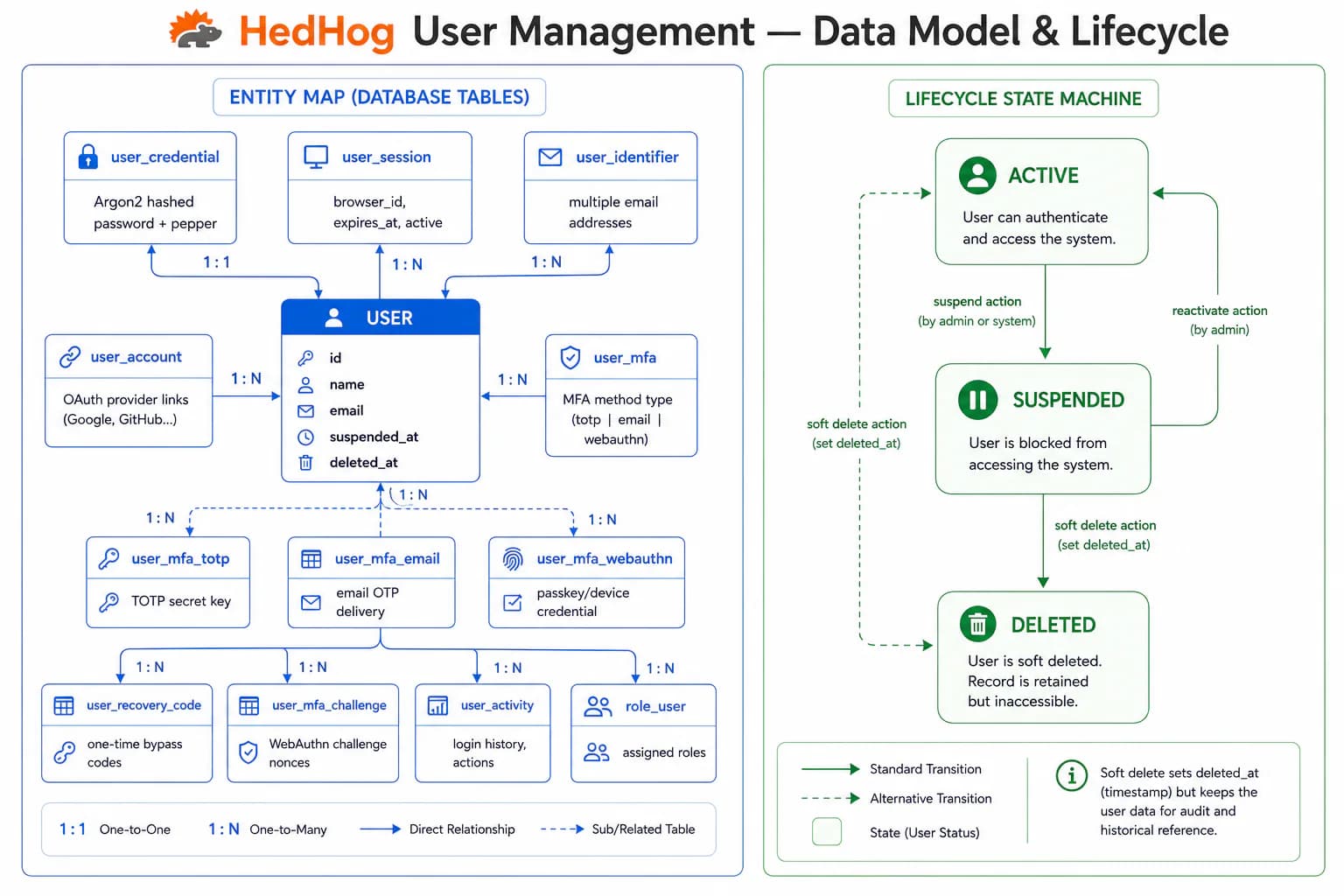
The User submodule handles the administrative side of user account management: creation, profile updates, avatar handling, role assignment, permission inspection, and identifier verification. It is intentionally separated from the Profile submodule, which handles self-service operations by authenticated users on their own accounts, enforcing the principle of least privilege at the API boundary.
Administrators holding the admin or admin-user role can create new accounts with a name, email, and initial password. Account updates allow changing the display name. Password resets set a new password on behalf of the user without requiring the current password, useful for locked-out accounts and onboarding flows where the initial credential must be reset immediately. Deletion via DELETE /user permanently removes accounts with no soft-delete option.
User avatars are stored via the File submodule. POST /user/:userId/avatar accepts a multipart image, stores it, and links the resulting File record to the user. The avatar is then publicly accessible at GET /user/avatar/:fileId without authentication, enabling embedding in email templates, public-facing profiles, and third-party integrations. Profile owners can also manage their own avatar through PUT /profile/avatar in the Profile submodule.
Role assignment can be managed from the user side: POST /user/:userId/role/:roleId assigns a single role and DELETE /user/:userId/role/:roleId revokes it. GET /user/:userId/role lists all roles currently held by a user. These endpoints complement the Role submodule's batch-replacement approach — both paths write to the same join table and can be used interchangeably.
The permission inspection endpoints GET /user/:userId/menu and GET /user/:userId/route return the effective set of menu entries and HTTP routes accessible to a specific user, computed from the union of all assigned roles. These are used by the admin panel to display an accurate summary of what a user can do without requiring the admin to manually union multiple role definitions.
User identifiers (email addresses) go through a verification flow by default. POST /user/:userId/verify-identifier/:identifierId allows admins to force-mark an identifier as verified, bypassing the email confirmation step. This is useful for seeding test users, migrating accounts from legacy systems, or resolving support escalations where the user cannot access the verification email.
HTTP Endpoints
14 endpoints
List all users with pagination.
- Query
- page, pageSize, search
Get user details by ID.
- Params
- userId (int)
Serve a user's avatar image publicly.
- Params
- fileId (int)
Create a new user account.
Body
| Field | Type | Required | Notes |
|---|---|---|---|
| name | string | yes | — |
| string | yes | Valid email address | |
| password | string | yes | Strong password |
Update a user's profile information.
- Params
- userId (int)
Body
| Field | Type | Required | Notes |
|---|---|---|---|
| name | string | no | — |
Reset a user's password as an admin.
- Params
- userId (int)
Body
| Field | Type | Required | Notes |
|---|---|---|---|
| password | string | no | Strong password |
Upload or replace a user's avatar.
- Params
- userId (int)
Body
| Field | Type | Required | Notes |
|---|---|---|---|
| file | File | yes | Image file, multipart/form-data |
Force-verify a user identifier (e.g. email) as an admin.
- Params
- userId (int), identifierId (int)
Delete one or more user accounts.
Body
| Field | Type | Required | Notes |
|---|---|---|---|
| ids | number[] | yes | IDs to delete |
List roles assigned to a user.
- Params
- userId (int)
List routes accessible to a user.
- Params
- userId (int)
Assign a role to a user.
- Params
- userId (int), roleId (int)
Remove a role from a user.
- Params
- userId (int), roleId (int)
MCP Tools
Named tools callable by AI models via the Model Context Protocol (MCP).
core.users.meReturn the current authenticated user's full record
core.users.listList all users with pagination and search
core.users.getGet a user by ID
core.users.createCreate a new user
core.users.updateUpdate an existing user's information
core.users.reset-passwordSend a password reset link to a user
core.users.deleteDelete one or more users
core.users.rolesList roles assigned to a user
core.users.menusList menu entries accessible to a user
core.users.routesList routes the user is permitted to access
core.users.assign-roleAssign a role to a user
core.users.remove-roleRemove a role from a user
core.users.verify-identifierVerify a user identity token or identifier