

 GitHub
Get Hedhog updates in your inbox
New releases, fresh recipes, and breaking changes — no spam.
Core Submodule
role
Manages role CRUD and role relations to users, menus, routes and screens.
Source path: libraries/core/src/role
Module file: role.module.ts
Introduction
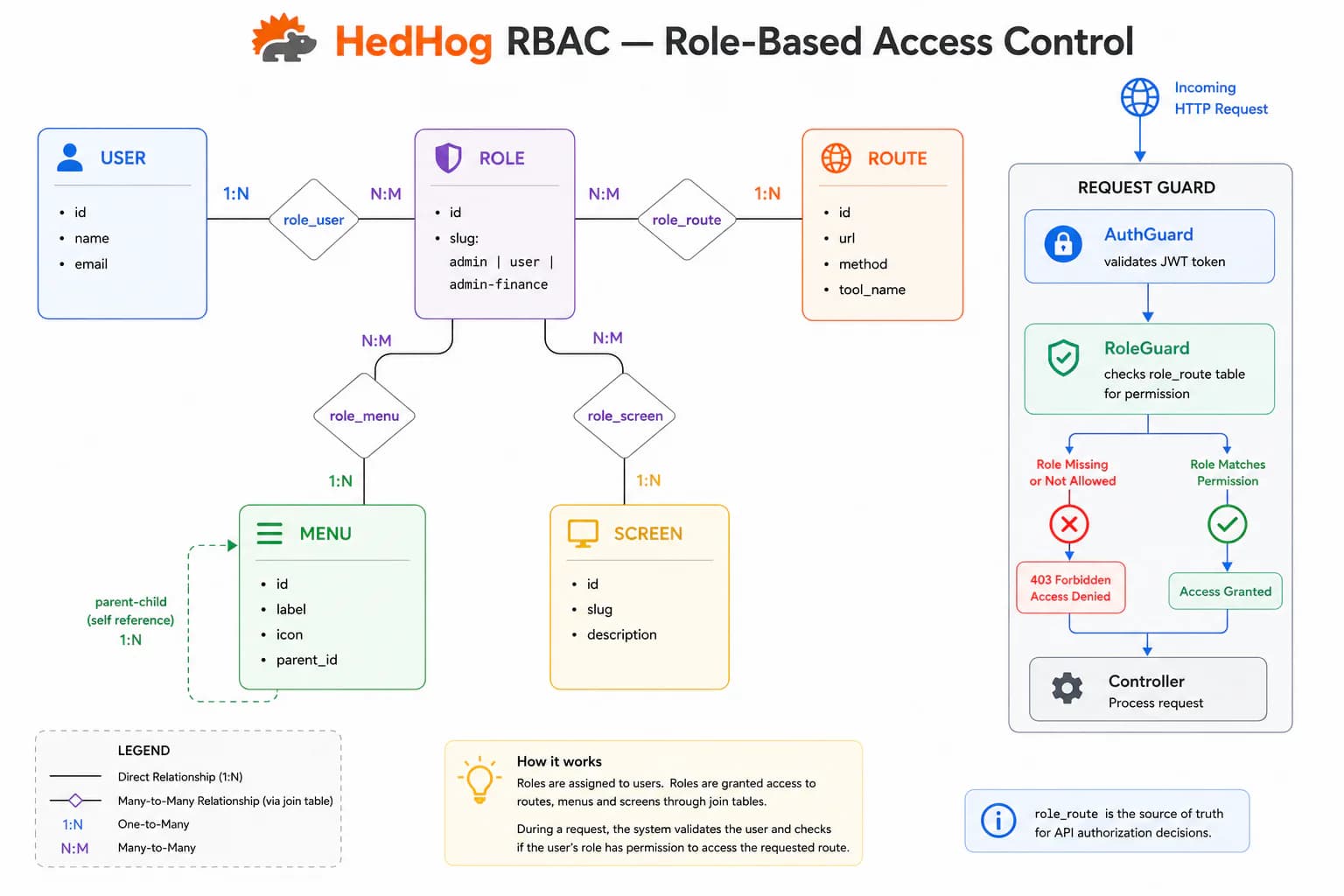
The Role submodule is the foundation of HedHog's Role-Based Access Control system, governing which users can access which resources across every part of the platform. Every protected resource — HTTP endpoints, admin menu entries, and screen definitions — is individually registered in the system. Roles bundle permitted resources together, and users hold one or more roles whose permissions are additive: the effective permission set is the union of all assigned roles. There is no role hierarchy or inheritance by default.
Permissions are structured along four axes. Routes define which HTTP endpoints (method + URL pattern) a role may call. Menus define which navigation entries are visible in the admin panel. Screens define which front-end page definitions are accessible. Users defines which accounts currently hold the role. Each axis is managed independently, giving fine-grained control over what each role can see and do without coupling navigation visibility to API access.
The admin role is a special system role seeded during installation that grants unrestricted access to all resources. It must not be deleted. Module-specific admin roles (admin-user, admin-mail, admin-finance) provide narrower administrative scopes for operators who should manage only a subset of the platform. These granular roles allow the principle of least privilege to be enforced even for administrative users.
Role assignments can be managed in either direction: from the role side (PATCH /role/:roleId/user replaces all users of a role at once) or from the user side (POST /user/:userId/role/:roleId assigns a single role). Both paths write to the same underlying join table and can be used interchangeably depending on whether the admin is thinking in terms of roles or users.
In the HedHog YAML workflow, role assignments for routes and menus are declared in role.yaml and route.yaml under each library's hedhog/data/ directory. These files are the source of truth for permission seeds applied during hedhog dev apply, ensuring permission changes travel through version control alongside the endpoints they govern.
HTTP Endpoints
13 endpoints
List all roles with pagination.
- Query
- page, pageSize, search
Get a role by ID.
- Params
- roleId (int)
Create a new role.
Body
| Field | Type | Required | Notes |
|---|---|---|---|
| slug | string | yes | — |
| locale | Record<string, { name: string, description: string }> | yes | e.g. {"en": {"name": "...", "description": "..."}} |
Update an existing role.
- Params
- roleId (int)
Body
| Field | Type | Required | Notes |
|---|---|---|---|
| slug | string | no | — |
| locale | Record<string, { name: string, description: string }> | no | — |
Delete one or more roles.
Body
| Field | Type | Required | Notes |
|---|---|---|---|
| ids | number[] | yes | IDs to delete |
List users assigned to a role.
- Params
- roleId (int)
- Query
- page, pageSize
Replace the user assignments for a role.
- Params
- roleId (int)
Body
| Field | Type | Required | Notes |
|---|---|---|---|
| ids | number[] | yes | Replacement set of IDs |
List routes permitted for a role.
- Params
- roleId (int)
- Query
- page, pageSize, search?, searchType?, method?
Replace the route permissions for a role.
- Params
- roleId (int)
Body
| Field | Type | Required | Notes |
|---|---|---|---|
| ids | number[] | yes | Replacement set of IDs |
List screens accessible to a role.
- Params
- roleId (int)
- Query
- page, pageSize
Replace the screen assignments for a role.
- Params
- roleId (int)
Body
| Field | Type | Required | Notes |
|---|---|---|---|
| ids | number[] | yes | Replacement set of IDs |
MCP Tools
Named tools callable by AI models via the Model Context Protocol (MCP).
core.roles.listList all roles with pagination
core.roles.getGet a role by ID
core.roles.createCreate a new role
core.roles.updateUpdate an existing role
core.roles.deleteDelete one or more roles
core.roles.users.listList users belonging to a role
core.roles.users.updateReplace the user assignments for a role
core.roles.menus.listList menus associated with a role
core.roles.menus.updateReplace the menu associations for a role
core.roles.routes.listList routes that the role has access to
core.roles.routes.updateReplace the route permissions for a role
core.roles.screens.listList screens associated with a role
core.roles.screens.updateReplace the screen assignments for a role