

 GitHub
Get Hedhog updates in your inbox
New releases, fresh recipes, and breaking changes — no spam.
Core Submodule
setting
Stores global/user settings and import/export workflow.
Source path: libraries/core/src/setting
Module file: setting.module.ts
Introduction
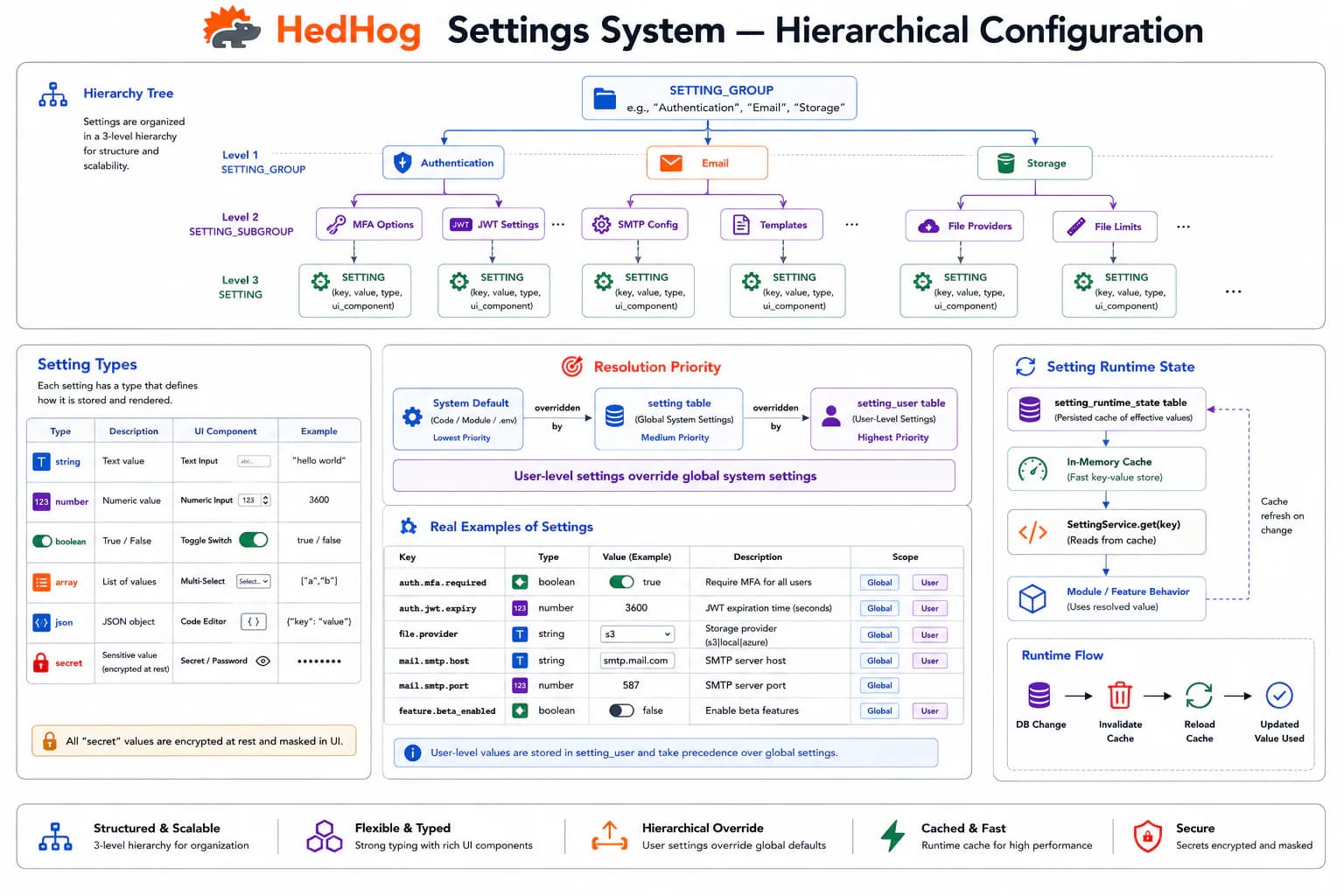
The Setting submodule provides a centralized, typed configuration store that separates operational parameters from code, enabling runtime adjustments to application behavior without deployments. Settings are organized into named groups (general, mail, security, ai) and each setting carries a type that drives both storage semantics and the input widget rendered in the admin panel.
Six value types are supported. String stores arbitrary text. Number stores numeric values. Boolean drives toggle switches and checkboxes. Array manages lists of string values rendered as tag inputs. JSON stores structured objects parsed at read time. Secret stores sensitive values (API keys, credentials, SMTP passwords) that are stored encrypted and automatically masked in list responses and export payloads — the raw value is only accessible through the setting service at runtime.
When a setting has user_override enabled, individual users can set their own value that takes precedence over the global default. GET /setting/effective merges the global value with any user-specific override, returning the final value that should govern behavior for the authenticated user. Theme selection, preferred language, and dashboard preferences are typical examples of user-overridable settings.
The public GET /setting/initial endpoint returns a curated subset of non-sensitive settings needed to render the frontend before the user authenticates — application name, logo URL, available locales, enabled OAuth providers. This eliminates hardcoded frontend configuration and enables white-label customization through the admin panel.
Settings can be exported as JSON via GET /setting/export. Import follows a two-step validation-then-confirm flow: upload a JSON file to POST /setting/import for validation, then POST the validated payload to POST /setting/import/confirm to apply. This guards against applying malformed or environment-mismatched configuration to production. List-type settings carry a set of selectable options managed via PUT /setting/:settingId/options, enabling custom dropdown values without code changes.
HTTP Endpoints
17 endpoints
Return the initial public settings required to bootstrap the frontend.
List setting groups.
- Query
- page, pageSize
Get all settings belonging to a specific group.
- Params
- slug (string)
- Query
- page, pageSize
List all settings with pagination.
- Query
- page, pageSize, search
Get a setting by ID.
- Params
- settingId (int)
Return all settings scoped to the current user.
Return the effective settings for the current user (global merged with user overrides).
Export all settings as JSON, optionally including secret values.
- Query
- secrets? (bool)
Create a new setting.
Body
| Field | Type | Required | Notes |
|---|---|---|---|
| slug | string | yes | Max 255 chars |
| type | "string" | "array" | "number" | "boolean" | "json" | "secret" | yes | — |
| component | "input-text" | "input-number" | "input-secret" | "input-file" | "input-tags" | "combobox" | "radio" | "color-picker" | "switch" | "checkbox" | no | — |
| value | string | yes | Max 1023 chars |
| user_override | boolean | yes | Whether users can override this setting |
| group_id | number | yes | — |
Upload a settings export file for import validation.
Body
| Field | Type | Required | Notes |
|---|---|---|---|
| file | File | yes | JSON export file, multipart/form-data |
Confirm and apply a previously validated settings import.
Body
| Field | Type | Required | Notes |
|---|---|---|---|
| settings | { slug: string, value: string }[] | yes | — |
Set multiple settings by slug in one request.
Body
| Field | Type | Required | Notes |
|---|---|---|---|
| [slug] | string | yes | Key-value map of slug → value pairs |
Update a setting by its slug.
- Params
- slug (string)
Body
| Field | Type | Required | Notes |
|---|---|---|---|
| value | string | yes | — |
Update a user-scoped setting by slug.
- Params
- slug (string)
Body
| Field | Type | Required | Notes |
|---|---|---|---|
| value | string | yes | — |
Replace the selectable options for a list-type setting.
- Params
- settingId (int)
Body
| Field | Type | Required | Notes |
|---|---|---|---|
| options | { id?: number, value: string, order?: number }[] | yes | Full replacement of selectable options |
Partially update a setting.
- Params
- settingId (int)
Body
| Field | Type | Required | Notes |
|---|---|---|---|
| slug | string | no | Max 255 chars |
| type | "string" | "array" | "number" | "boolean" | "json" | "secret" | no | — |
| component | string | no | — |
| value | string | no | — |
| user_override | boolean | no | — |
| group_id | number | no | — |
Delete one or more settings.
Body
| Field | Type | Required | Notes |
|---|---|---|---|
| ids | number[] | yes | IDs to delete |
MCP Tools
Named tools callable by AI models via the Model Context Protocol (MCP).
core.settings.getGet a setting value by key
core.settings.setSet a setting value by key
core.settings.listList all settings with pagination
core.settings.get-by-idGet a setting by its numeric ID
core.settings.groups.listList setting groups
core.settings.set-manyUpdate multiple settings at once
core.settings.update-from-slugUpdate a setting by group slug and setting slug
core.settings.deleteDelete one or more settings