

 GitHub
Get Hedhog updates in your inbox
New releases, fresh recipes, and breaking changes — no spam.
CAPTCHA
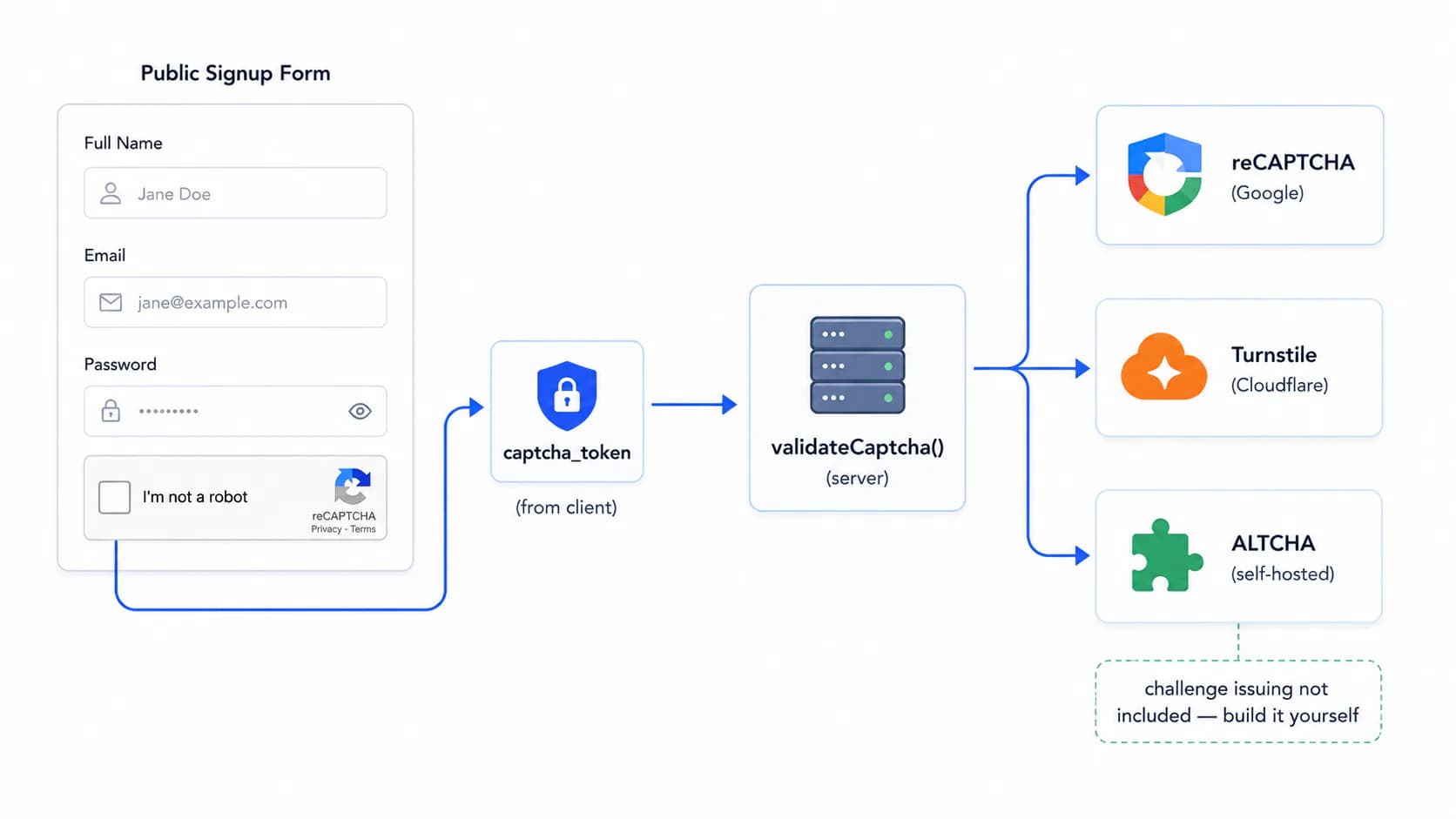
Hedhog can verify a CAPTCHA token server-side using Google reCAPTCHA, Cloudflare Turnstile, or ALTCHA. Today this is wired into exactly one place — the public campaign recipient list signup form — not into login, registration, or arbitrary contact forms. If you need CAPTCHA elsewhere, you can reuse the same verification logic, but you'll be wiring it up yourself rather than flipping a global switch.
Status: ⚠️ Limited scope — all three providers are genuinely implemented, but only the campaign public signup form actually calls them today.
Quick Setup
- Create an Integration Profile (type CAPTCHA, pick a provider) with its secret key at Settings → Integration Profiles
- Open the campaign recipient list you want to protect, enable CAPTCHA, and select the profile
- Embed the provider's widget on your public signup form yourself and send the solved token as
captcha_token
How It Works (today)
CAPTCHA is a per-list setting on campaign_recipient_list, not a global toggle:
| Column | Description |
|---|---|
enable_captcha | Boolean — whether this specific public signup list requires a CAPTCHA token |
captcha_integration_profile_id | Which Integration Profile (type captcha) to verify against |
When someone submits the public signup form (publicSignup() in CampaignRecipientListService) for a list with enable_captcha = true:
- The request must include a
captcha_tokenfield - Hedhog loads the configured Integration Profile and looks at its provider slug
- It calls the matching provider's verification logic synchronously, server-side, before the recipient is ever written to the database
- A failed or missing token returns
400 Bad Request— the signup never happens
All three providers below are genuinely implemented and verified server-side — this isn't a "some providers are stubs" situation.
What Hedhog Does Not Do For You
There is no endpoint that returns a CAPTCHA site_key to the browser, and no endpoint that issues an ALTCHA challenge. If you're building the public-facing signup page yourself:
- For reCAPTCHA/Turnstile, you already know your own
site_key(it's the public counterpart to thesecret_keyyou typed into the Integration Profile) — embed the provider's widget script directly with that key, you don't need Hedhog to hand it back to you - For ALTCHA, which needs a server to issue a signed challenge before the client can solve it, Hedhog only verifies the solved challenge — you'll need to add your own small endpoint that generates the challenge (salt + HMAC) using the same
hmac_key, or use ALTCHA's own server-side helper package to do so, beforevalidateCaptchawill have anything valid to check
Google reCAPTCHA
Console: google.com/recaptcha/admin
- Register a new site, choosing reCAPTCHA v2 (checkbox challenge) or v3 (invisible, score-based)
- Add your domain to the allowed domains list
- Copy the Site key (goes in your frontend widget code) and Secret key (goes in the Integration Profile)
| Config field | Description |
|---|---|
secret_key | Server-side secret used against https://www.google.com/recaptcha/api/siteverify |
Hedhog's verification only checks success in Google's response — it does not currently enforce a v3 score threshold, so if you use v3, decide your own acceptable score and add that check if you need it.
Cloudflare Turnstile
Console: dash.cloudflare.com → Turnstile
- Add a new site under Turnstile, choose a widget mode (Managed, Non-interactive, or Invisible)
- Copy the Site key (frontend) and Secret key (Integration Profile)
| Config field | Description |
|---|---|
secret_key | Server-side secret used against https://challenges.cloudflare.com/turnstile/v0/siteverify |
ALTCHA
ALTCHA is a self-hosted, proof-of-work CAPTCHA with no calls to a third-party verification API — verification is pure cryptography against a key only you hold.
Project: altcha.org
| Config field | Description |
|---|---|
hmac_key | Secret used to both sign challenges (your responsibility, see above) and verify solved tokens (handled by Hedhog) |
Hedhog's verification decodes the base64 token into { algorithm, challenge, number, salt, signature }, recomputes sha256(salt + number) and checks it equals challenge, then recomputes an HMAC-SHA256 over challenge with your hmac_key and checks it equals signature. Both checks must pass.
Enabling CAPTCHA on a List
- Create an Integration Profile of type CAPTCHA with the provider and
secret_key/hmac_keyabove - On the campaign's recipient list settings, enable CAPTCHA and select that profile
- Make sure your public signup form sends the solved token as
captcha_tokenin the request body
Which Provider to Choose
- reCAPTCHA — widest adoption, but sends visitor data to Google and the v2 challenge adds friction
- Turnstile — privacy-friendlier, usually invisible, backed by Cloudflare's network
- ALTCHA — zero third-party network calls and no data leaves your infrastructure, at the cost of having to host the challenge-issuing endpoint yourself
Verify It Worked
- Submit the public signup form without solving the CAPTCHA — it should be rejected with
400 Bad Request - Solve the widget and submit again — the recipient should now be created in the list
Troubleshooting
| Symptom | Likely cause |
|---|---|
CAPTCHA is enabled but no profile is configured | enable_captcha is on but captcha_integration_profile_id is empty |
CAPTCHA validation failed for every ALTCHA submission | The challenge wasn't signed with the same hmac_key configured in the profile, or there's no challenge-issuing endpoint at all yet |
Unsupported CAPTCHA provider | The profile's provider isn't one of recaptcha, cloudflare-turnstile, altcha |
| Works on staging, fails in production for reCAPTCHA/Turnstile | The production domain isn't in the provider's allowed-domains list |