

 GitHub
Get Hedhog updates in your inbox
New releases, fresh recipes, and breaking changes — no spam.
Multi-Factor Authentication
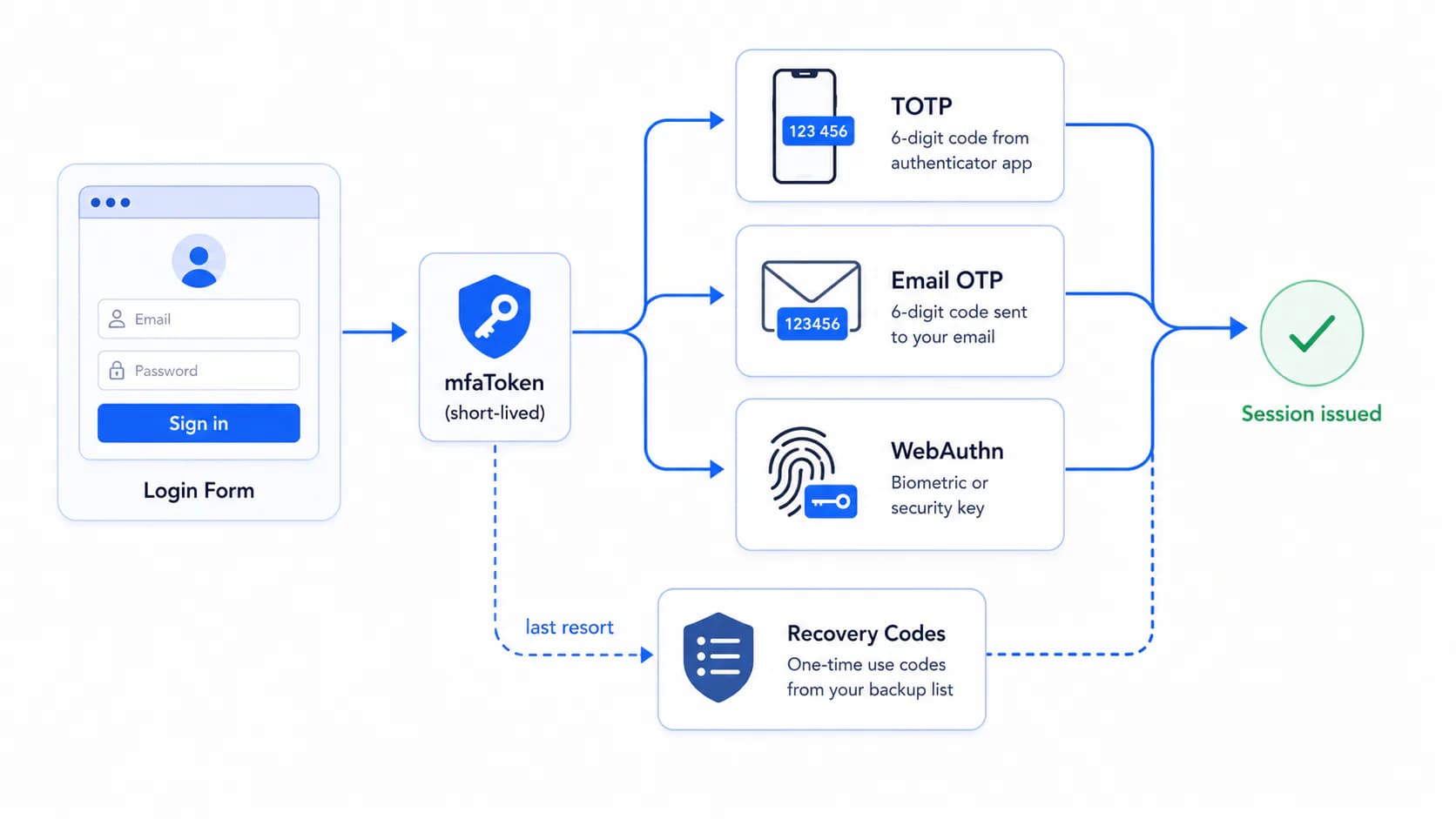
Hedhog supports three second-factor methods — TOTP (authenticator apps), email one-time codes, and WebAuthn (passkeys/security keys) — plus single-use recovery codes for account recovery. This is a fully implemented feature, built on speakeasy (TOTP), qrcode (QR generation), and @simplewebauthn/server (WebAuthn), all in libraries/core/src/profile/.
Status: ✅ Fully implemented — TOTP, Email OTP, WebAuthn, and recovery codes all work, including the login-challenge flow.
Quick Setup
- Make sure an email provider is configured if you'll allow Email OTP
- Enroll TOTP yourself first:
POST /profile/totp/generate→ scan the QR code →POST /profile/totp/verify - Log out and back in — confirm the response returns
requiresMfa: truebefore any token is issued, and that submitting the code completes login - Save the recovery codes shown at enrollment — there's no way to view them again later
How It Works
Enrolling a method (while already logged in)
All enrollment happens through /profile/* endpoints, scoped to the logged-in user:
| Step | Endpoint |
|---|---|
| 1. Confirm it's really you before adding a new method | POST /profile/mfa/check-verification → POST /profile/mfa/verify-before-add |
| 2a. TOTP: generate a secret + QR code | POST /profile/totp/generate |
| 2a. TOTP: confirm the first 6-digit code to activate | POST /profile/totp/verify |
| 2b. Email OTP: send a code to the account's email | POST /profile/mfa/email/verify |
| 2b. Email OTP: confirm the code to activate | POST /profile/mfa/email/verify/confirm |
| 2c. WebAuthn: start registration (passkey/security key) | POST /profile/webauthn/generate |
| 2c. WebAuthn: confirm the attestation | POST /profile/webauthn/verify |
Every enrolled method becomes a row in user_mfa (type ∈ totp, email, webauthn), with the secret/credential stored in a matching user_mfa_totp, user_mfa_email, or user_mfa_webauthn table.
The login challenge (second factor at sign-in)
This is the part that's easy to miss if you only read the enrollment endpoints: login itself does not call any /profile/mfa/* route. Once a password is verified for a user with at least one MFA method enrolled, AuthService returns:
{ "requiresMfa": true, "mfaToken": "..." }
instead of an access token. Your login UI must check for requiresMfa and prompt for the second factor using that short-lived mfaToken — not the user's session:
| Method | Endpoint |
|---|---|
| TOTP or email code | POST /auth/verify-mfa-code with { mfaToken, code, methodType } (methodType: totp, email, or recovery) |
| Resend the email code | POST /auth/resend-mfa-code with { token: mfaToken } |
| WebAuthn | POST /auth/webauthn/authenticate/generate with { mfaToken }, then POST /auth/webauthn/authenticate/verify with { mfaToken, assertionResponse } |
| Recovery code (locked out of every other method) | dedicated recovery-code verification endpoint, also keyed by mfaToken |
Only after one of these succeeds does the backend issue the real access/refresh token pair.
Settings
| Setting key | Description |
|---|---|
require-mfa | Force MFA enrollment globally — without this, MFA is opt-in per user |
mfa-issuer | Name shown inside the authenticator app next to the code (defaults to Hedhog) |
mfa-window | Tolerance window, in 30-second TOTP intervals, to absorb clock drift between server and phone (default 1) |
mfa-setp | TOTP time-step in seconds (default 30) — yes, it's spelled setp in the real setting slug, not a typo in this doc |
mfa-email-code-length | Digits in the emailed OTP (default 6) |
mfa-challenge-expiration-minutes | How long an mfaToken (and any pending email/WebAuthn challenge) stays valid before the user must restart login (default 15) |
Configure these in Settings → Configurations → Authentication — MFA settings live in this group, not a dedicated "MFA" one.
TOTP — Authenticator Apps
Works with any RFC 6238 app: Google Authenticator, Authy, Microsoft Authenticator, 1Password, Bitwarden.
- Client calls
POST /profile/totp/generate— server returns{ secret, otpauthUrl, qrCode } - User scans the
qrCode(or manually enterssecret) in their authenticator app - Client calls
POST /profile/totp/verifywith the first 6-digit code the app shows, plus thesecretand anamefor the device - Hedhog validates the code against the secret (honoring
mfa-window/mfa-setp) and, only on success, persists the method and issues recovery codes if this is the user's first MFA method
If the code is always rejected even when freshly generated, the most common cause is real clock drift on the server or the user's phone — mfa-window absorbs a little of this, but not unlimited drift.
Email OTP
No app required — works for any user with a verified email.
POST /profile/mfa/email/verifysends a code (length permfa-email-code-length) to the account's emailPOST /profile/mfa/email/verify/confirmactivates it once the user enters the code
At login, the equivalent pair is POST /auth/verify-mfa-code (methodType: 'email') and POST /auth/resend-mfa-code if the code expired or never arrived. Email OTP obviously depends on a working email provider — if mail delivery is broken, users enrolled only in email MFA will be locked out of login entirely, not just enrollment.
WebAuthn — Passkeys & Security Keys
Standards-based, phishing-resistant second factor using the browser's native WebAuthn API (Touch ID, Windows Hello, hardware keys like YubiKey).
POST /profile/webauthn/generatereturns registration options (nameis the label shown for this device later)- The browser's
navigator.credentials.create()call uses those options to produce an attestation POST /profile/webauthn/verifywith that attestation completes registration, storing the credential inuser_mfa_webauthn
At login: POST /auth/webauthn/authenticate/generate (with mfaToken) returns assertion options for navigator.credentials.get(), and POST /auth/webauthn/authenticate/verify (with mfaToken + the resulting assertionResponse) completes login.
Recovery Codes
Generated automatically the first time a user enrolls any MFA method — 10 single-use codes, shown once, hashed with argon2 in user_recovery_code before storage (Hedhog never stores them in retrievable form, so there's no "view my recovery codes again" feature by design).
| Endpoint | Purpose |
|---|---|
POST /profile/recovery-codes/send-verification → POST /profile/recovery-codes/regenerate | Invalidate all old codes and issue a fresh set of 10 |
DELETE /profile/mfa/:mfaId/remove-with-recovery-code | Use a recovery code to remove a lost MFA method (e.g. phone with the authenticator app was lost) when no other method is available |
Tell users explicitly, at enrollment time, that losing both their second factor and their recovery codes means permanent lockout barring manual admin/database intervention — there is no "support resets your MFA" flow built in.
Try this once, in a non-production environment: use a recovery code to log in and confirm it actually works before you depend on it for real.
Removing a Method
Every removal endpoint requires re-proving identity first — you cannot silently strip MFA from a hijacked session:
| Method | Endpoint |
|---|---|
| TOTP | DELETE /profile/totp/:mfaId/remove with { token } from check-verification-remove |
DELETE /profile/email/:mfaId/remove with { token, hash } | |
| WebAuthn | DELETE /profile/webauthn/:mfaId/remove |
| Any method, via recovery code | DELETE /profile/mfa/:mfaId/remove-with-recovery-code |
Verify It Worked
- Log out and log back in with a user who has MFA enrolled — confirm the response includes
requiresMfa: truebefore any token is issued - Submit the second factor and confirm you only now receive
accessToken/refreshToken - Test one recovery code as described above — don't wait until you're actually locked out to find out it doesn't work
Troubleshooting
| Symptom | Likely cause |
|---|---|
Login response has requiresMfa: true but the frontend shows a generic error | UI isn't handling requiresMfa — it must branch into the second-factor screen instead of treating the response as a failed login |
| TOTP codes never validate | Clock drift beyond mfa-window × mfa-setp seconds, or the wrong secret was scanned |
| User locked out after losing their phone | Use a recovery code via verify-mfa-code (methodType: 'recovery') at login, or remove-with-recovery-code once logged in elsewhere |
| Email MFA users can't log in at all | The configured email provider is broken — fix that first, this isn't an MFA bug |