

 GitHub
Get Hedhog updates in your inbox
New releases, fresh recipes, and breaking changes — no spam.
Core Submodule
dashboard
Manages dashboard definitions, items, templates, sharing and role binding.
Source path: libraries/core/src/dashboard
Module file: dashboard.module.ts
Introduction
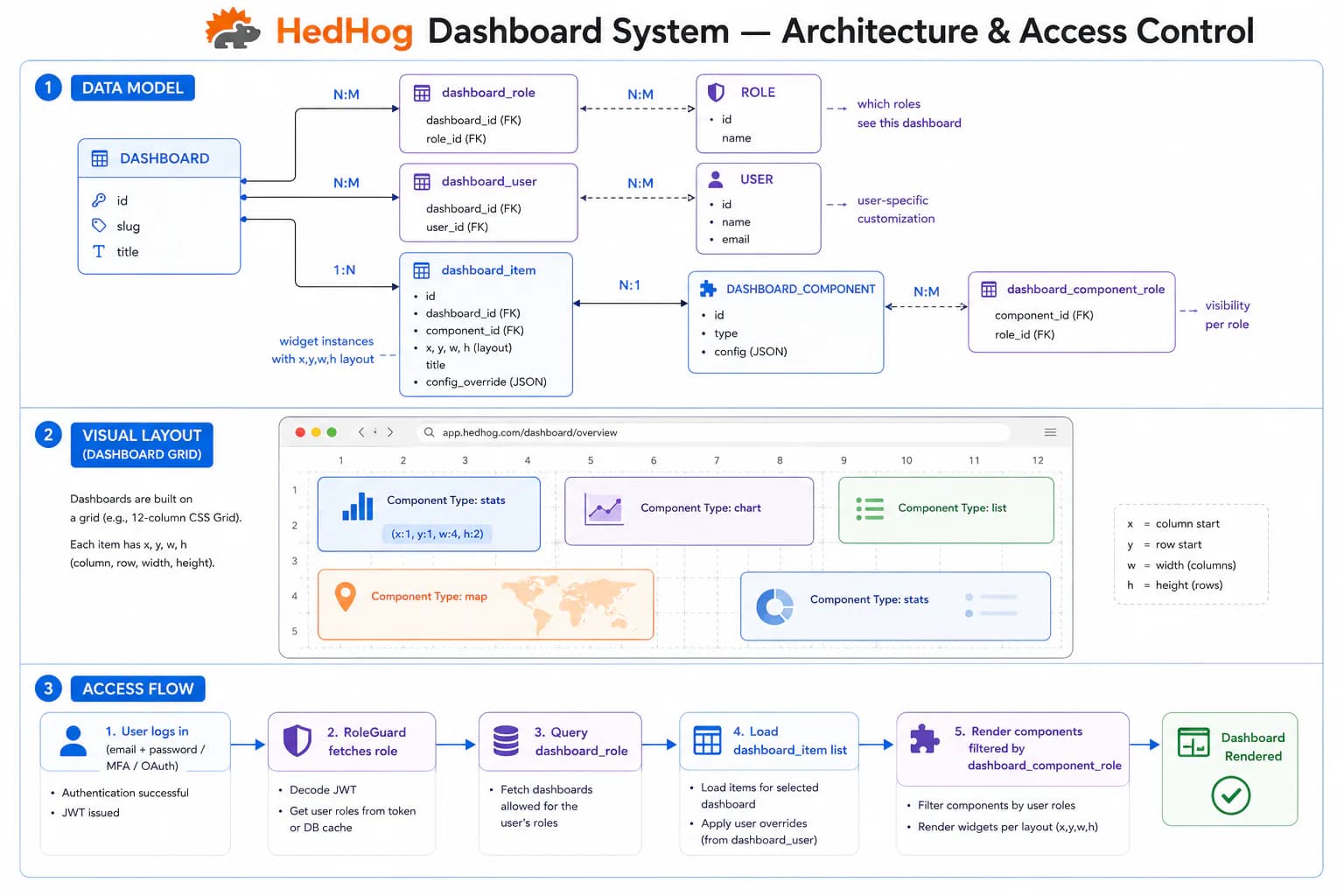
The Dashboard submodule powers a flexible, multi-user dashboard engine where each dashboard is composed of independently positioned and resized widget components arranged in a configurable grid. Dashboards are named containers identified by a slug; widget components are registered UI component definitions that declare default, minimum, and maximum grid sizes along with an optional library scope and preview screenshot.
Widget instances link a component to a dashboard with an explicit position (x_axis, y_axis) and size (width, height), allowing the same component type to appear in multiple dashboards at different sizes and positions. Layout changes made by a user through drag-and-drop are persisted via POST /dashboard-core/layout/:slug, which takes the full set of positioned items and overwrites the previous arrangement — the server is always the source of truth for the grid state.
Each user can maintain personal dashboards and designate one as their home dashboard. Dashboards can be shared with specific named users, giving collaborators view access without granting admin access to the underlying configuration. Shared access can be revoked per-user at any time. Dashboard templates provide pre-configured starting layouts that users can clone when creating a new dashboard, reducing the barrier for onboarding.
Both dashboards and individual widget components support role bindings. When a role is assigned to a dashboard or component, only users holding that role can see it. This enables tenant-specific or feature-flagged dashboard surfaces within the same deployment without maintaining separate installations.
The overview dashboard is fed by three dedicated statistics endpoints: user stats (active accounts, recent signups), mail stats (sent volume, error rates, read rates), and system stats (uptime, memory usage, Node.js version). Each stats endpoint is separately role-gated, so operators can expose only the metrics relevant to each role.
HTTP Endpoints
53 endpoints
List all dashboard definitions with pagination.
- Query
- page, pageSize, search
Get a dashboard definition by ID.
- Params
- id (int)
Create a new dashboard definition.
Body
| Field | Type | Required | Notes |
|---|---|---|---|
| slug | string | yes | — |
| locale | Record<string, { name: string }> | yes | e.g. {"en": {"name": "..."}} |
Update an existing dashboard definition.
- Params
- id (int)
Body
| Field | Type | Required | Notes |
|---|---|---|---|
| slug | string | no | — |
| locale | Record<string, { name: string }> | no | — |
Delete a dashboard definition.
- Params
- id (int)
Get the home dashboard for the current user.
List all dashboards accessible to the current user.
List available dashboard templates for creating new dashboards.
Check whether the current user has access to a dashboard by slug.
- Params
- slug (string)
Return user-related statistics for the overview dashboard.
Return mail-related statistics for the overview dashboard.
Return system-level statistics for the overview dashboard.
Return configuration data used by the overview dashboard.
Return widget data belonging to the current user.
Get the saved layout for the current user on a specific dashboard.
- Params
- slug (string)
Get a dashboard by its slug.
- Params
- slug (string)
Create a personal dashboard for the current user.
Body
| Field | Type | Required | Notes |
|---|---|---|---|
| name | string | yes | — |
| slug | string | yes | — |
| icon | string | no | — |
| templateSlug | string | no | Slug of an existing template to clone |
Save the current user's layout for a dashboard.
- Params
- slug (string)
Body
| Field | Type | Required | Notes |
|---|---|---|---|
| dashboard_id | number | yes | — |
| items | { id: number, width: number, height: number, x_axis: number, y_axis: number }[] | yes | — |
Set the specified dashboard as the home dashboard for the current user.
- Params
- slug (string)
Add a widget component to the specified dashboard.
- Params
- slug (string)
Body
| Field | Type | Required | Notes |
|---|---|---|---|
| componentSlug | string | yes | Slug of the component to add |
Reorder the current user's dashboards.
Body
| Field | Type | Required | Notes |
|---|---|---|---|
| slugs | string[] | yes | Dashboard slugs in desired order |
Update the name or icon of a personal dashboard.
- Params
- slug (string)
Body
| Field | Type | Required | Notes |
|---|---|---|---|
| name | string | no | — |
| icon | string | no | — |
Delete a personal dashboard.
- Params
- slug (string)
Remove a widget from the specified dashboard.
- Params
- slug (string), widgetId (int)
List all registered dashboard widget components.
- Query
- page, pageSize, search
List widget components accessible to the current user, optionally filtered by library.
- Query
- page, pageSize, librarySlug?, exclude?
Get a dashboard component by ID.
- Params
- id (int)
Register a new dashboard widget component.
Body
| Field | Type | Required | Notes |
|---|---|---|---|
| slug | string | yes | — |
| width | number | yes | Default widget width (grid units) |
| height | number | yes | Default widget height (grid units) |
| library_slug | string | no | — |
| min_width | number | no | — |
| max_width | number | no | — |
| min_height | number | no | — |
| max_height | number | no | — |
| is_resizable | boolean | no | — |
| locale | Record<string, { name: string, description?: string }> | yes | e.g. {"en": {"name": "..."}} |
Update a dashboard widget component.
- Params
- id (int)
Body
| Field | Type | Required | Notes |
|---|---|---|---|
| slug | string | no | — |
| width | number | no | — |
| height | number | no | — |
| library_slug | string | no | — |
| min_width | number | no | — |
| max_width | number | no | — |
| min_height | number | no | — |
| max_height | number | no | — |
| is_resizable | boolean | no | — |
| locale | Record<string, { name: string, description?: string }> | no | — |
Upload a preview screenshot for a dashboard component.
- Params
- id (int)
Body
| Field | Type | Required | Notes |
|---|---|---|---|
| file | File | yes | Image file, multipart/form-data |
Delete a dashboard widget component.
- Params
- id (int)
List widget instances belonging to a dashboard.
- Query
- dashboardId (int), page, pageSize
Add a widget instance to a dashboard.
Body
| Field | Type | Required | Notes |
|---|---|---|---|
| component_id | number | yes | — |
| dashboard_id | number | yes | — |
| width | number | yes | — |
| height | number | yes | — |
| x_axis | number | yes | — |
| y_axis | number | yes | — |
Remove a widget instance from a dashboard.
- Params
- id (int)
List role assignments for a dashboard.
- Query
- dashboardId (int), page, pageSize
Assign a role to a dashboard.
Body
| Field | Type | Required | Notes |
|---|---|---|---|
| dashboard_id | number | yes | — |
| role_id | number | yes | — |
Assign multiple roles to a dashboard in one request.
Body
| Field | Type | Required | Notes |
|---|---|---|---|
| dashboard_id | number | yes | — |
| role_ids | number[] | yes | ArrayNotEmpty |
Remove a role assignment by record ID.
- Params
- id (int)
Remove a specific role from a specific dashboard.
- Params
- dashboardId (int), roleId (int)
List role assignments for a dashboard component.
- Query
- componentId (int), page, pageSize
Assign a role to a dashboard component.
Body
| Field | Type | Required | Notes |
|---|---|---|---|
| component_id | number | yes | — |
| role_id | number | yes | — |
Assign multiple roles to a component in one request.
Body
| Field | Type | Required | Notes |
|---|---|---|---|
| component_id | number | yes | — |
| role_ids | number[] | yes | ArrayNotEmpty |
Remove a component role assignment by record ID.
- Params
- id (int)
Remove a specific role from a specific component.
- Params
- componentId (int), roleId (int)
List user-dashboard associations.
- Query
- page, pageSize, search
Get a user-dashboard association by ID.
- Params
- id (int)
Create a user-dashboard association.
Body
| Field | Type | Required | Notes |
|---|---|---|---|
| dashboard_id | number | yes | — |
| user_id | number | yes | — |
Update a user-dashboard association.
- Params
- id (int)
Body
| Field | Type | Required | Notes |
|---|---|---|---|
| dashboard_id | number | no | — |
| user_id | number | no | — |
Delete user-dashboard associations.
Body
| Field | Type | Required | Notes |
|---|---|---|---|
| ids | number[] | yes | IDs to delete |
MCP Tools
Named tools callable by AI models via the Model Context Protocol (MCP).
core.dashboard.*Full CRUD and sharing operations for dashboard definitions
core.dashboard-items.*Full CRUD operations for dashboard widget items